What's New ✨
What has landed in Artemis Cosmos, newest release first — across the LegendaryMissions content and the sbs_utils library that powers it.
v1.4.0
Start at the top and stop whenever you like: each part runs from the new things to play, through the things you already do that now work better, to mission writing, the tools, and finally the library changes. Links go to the relevant docs.
The short version
| What it is | |
|---|---|
| The ePADD | One button on every console opens a screen of apps — mail, quests, cargo, the boarding party — each with a live badge you can read without opening it. |
| "On screen" | The captain says it and science can finally do it: hand the main screen a shot of whatever science has selected. |
| Incoming hails | Comms stops being something only the crew start. The mission calls you, and waits until somebody answers. |
| Starbases launch fighters | Bases hold named fighter wings you can launch, reassign and recall - and a base with no crew to command it flies them itself, enemy bases included. |
| Command your allies | Every friendly ship, turret and starbase takes the orders it can actually carry out: escort, patrol, retreat, investigate, return to base, hold fire. |
| The old missions fly again | All 27 Artemis 2.8 missions in our archive crossed over, and they play — same fleets, same tempers, same voice over comms. |
| A living bestiary | Seven new species over one behavior, each one aging from Young to Ancient. Scan it before you shoot it. |
| Grav-tether | Reel, tow and lock — on a beam that now feels the weight, and tells you when it is struggling. |
| Engineering has something to do | Systems wear, and a well-run ship can be tuned above spec. Work orders, a four-tab panel rebuilt for touch, and eight efficiency numbers nobody could see before. |
| New faces | Every portrait in the game redrawn - faces that frown, glare, blink and talk, skin in any color you like, and a Randomize button. |
| The console picker | The first screen of the night now tells you who you are about to be. |
| Beacons & the Fabricator | Engineering builds ordnance over a timer and hands it to the tube. The coordination is the gameplay. |
| Readouts at a glance | Efficiency, shields, quest progress and what a build still needs are drawn as bars, the way the engine's own panels are - and Help pages link to each other. |
| Write the mission, don't program it | Quests, dialogue, drops, markers and whole missions as readable AMD documents. |
| The Casino | Eight games, a bar with rumors, and a grey market for anyone the regulars come to trust. |
| The Director | Cut your stream like a broadcast: rundowns, preview and program, titles that write themselves. |
Take it for a spin
The new things to do — whole systems that were not there before. Start here.
📟 The ePADD — every console gets apps
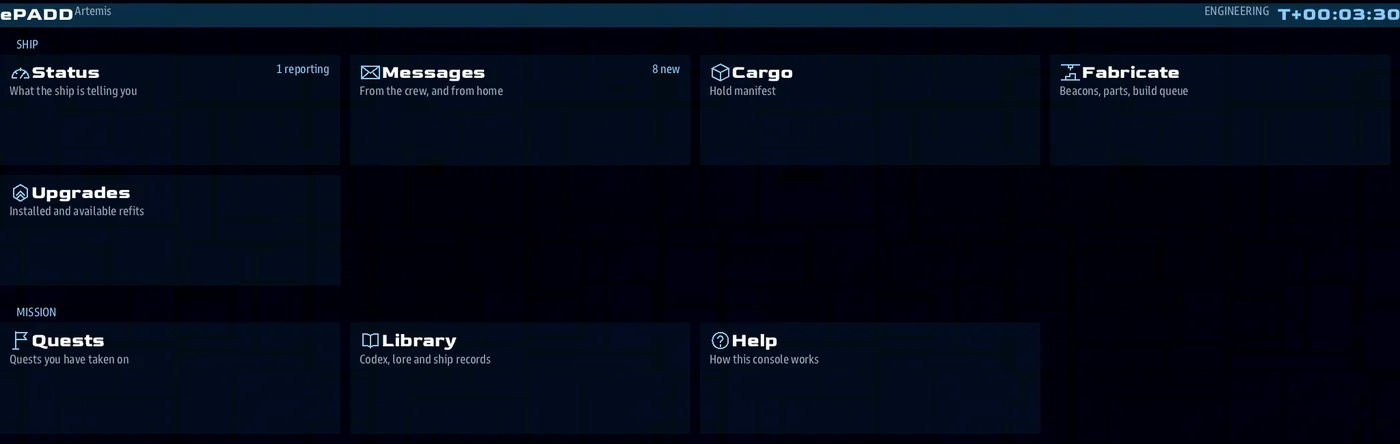
A console used to offer three tabs along the top — help, library, upgrade — each
labeled with the raw lowercase name of whatever wrote it, and nowhere to put anything
else.
Now one button opens a whole device. ePADD is a screen of app tiles, named and described and grouped, with only the ones this station should see:
[ ePADD ][ back ]                                    Artemis        T+00:14:22

  Ship
   [ Boarding Party ]   [ Status  2 ]   [ Messages  3 ]   [ Cargo ]
   [ Fabricate 1 ] [ Upgrades ]

  Mission
   [ Quests  2 ]   [ Library ]     [ Help ]
- A tile tells you whether it is worth opening. The number on it is live: three unread, two things building, the quest count. Previously the only way to find out was to go and look, on a bar that did not have room to say.
- A badge above the ship data names who is sitting there and how many apps have
something waiting —
Lt Marek (2)— on every console, without opening anything. - Messages. The crew can text each other, because it is a bridge simulator full of people sitting at separate screens who cannot see one another, and passing a note is half of what they would do if they could. The same inbox carries mail from the story — a letter from your sister, a note from the admiral — and a letter can ask a question, with up to four things you can say back. Replies land in the thread, so it reads as a conversation rather than a form you filled in.
- A mission's mail is a document a writer can be handed. One heading per letter, a
From:, aTo:naming a console, andAfter:for how far into the mission it arrives. No code. - The boarding party carries it down. A landing party's own apps travel with the party, and the scene they are playing is mirrored into the inbox, so the surface crew read their story where they read everything else — one device, wherever the person is.
- It fits the screen it is on. Thirty apps at 1024x768 is a scrolling list; the same thirty at 1920x1080 is a grid. Nothing is ever cut off the bottom.
For authors, an app is one route and one line of registration — //gui/app/cargo plus
gui_app_register("cargo", title="Cargo", consoles="engineering", status=hold_count) —
and the route keeps its own if, which is still what decides whether the app is offered
at all.
Docs: The ePADD.
🖥️ "On screen" — science can finally answer the captain
The captain says "on screen" and, until now, nobody could make it happen. A drop-down beside the science console's Follow checkbox hands the ship's main screen a shot of whatever science has selected.
[x] Follow   [ On Screen - Orbit   v ]
                Off
                On Screen - Dolly
                On Screen - Orbit
                Tactical 2D
Dolly pushes slowly in and out, Orbit turns around the contact, and Tactical 2D puts the radar on it. Change the selection and the shot follows; destroy the contact and the viewer stands down.
Beside the picture is a data column carrying what science actually knows: vitals
(range, bearing, shields, hull), every scanned tab together — Scan, Status, Intel,
Materials, Bio — recent comms with that contact, and any quest bound to it. It pages
itself when there is more than one screenful, and skips pages that have nothing to say.
A mission adds its own page with viewscreen_page_register.
Nothing has to be co-ordinated with helm: the viewer writes the same main-screen state helm's own control does, so last writer wins — helm reaching for the control simply takes the screen back, and the drop-down falls back to Off. It is scoped per ship, so science on one bridge cannot change what another's crew is looking at.
Writing your own main-screen console?
While a shot runs, the console is assigned to the subject — the engine only
honors a camera change when the console and the lens ride the same object. So
sbs.get_ship_of_client() on a main screen answers with the contact being filmed.
Use viewscreen_home_ship(client_id) for "this console's own ship".
See On screen.
📞 Incoming hails — the mission calls you
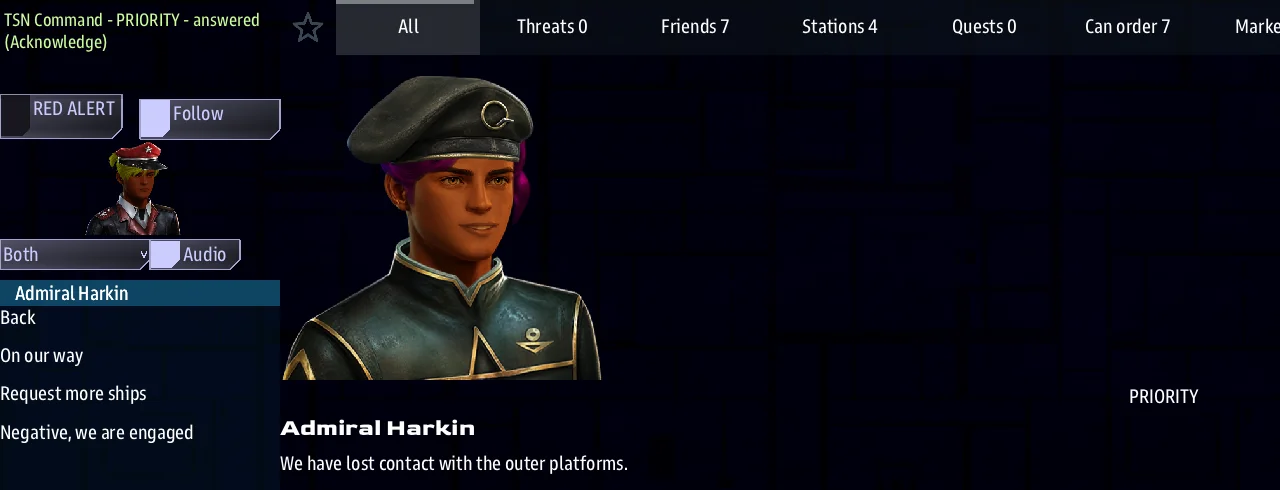
Comms has always been something the crew starts: pick a contact, a menu opens. An incoming hail is the other direction. It arrives in an Incoming Hails list on the comms console, newest first, and waits until somebody answers it.
Answering opens a short conversation with up to four things the crew can say back. Back
steps out without answering, so comms can read a hail through and present it later, when
the captain is ready. Answered conversations stay in the info panel and can be replayed
— a replay can never change what was chosen.
Beside the list is a dial that decides where the conversation is drawn — Off, This Console, Main Screen, or Both — and an Audio checkbox. Each console carries its own dial, so putting a hail on the main screen is a decision one officer makes, not something the mission forces on the bridge.
While a hail is placed on a comms console, that console's 2D radar follows whoever is calling, the way science points it at a scan target. It obeys the crew's existing Follow checkbox, and it hands the radar back afterwards.
Here There Be Monsters is written this way end to end: twenty scenes in one document, each named by one line of the story.
🛩️ Starbases launch fighters
A starbase with hangar bays now holds wings of fighters - Red, Gold, Blue - and each one is yours to command from the base's comms menu:
- Launch Red wing (4/4) at a hostile, or to protect an ally.
- Once it is out: Reassign Red wing (2 out) onto a new target, or Recall it.
- A command starbase flies two wings, so one can cover the station while the other strikes.
Fighters launch with a few minutes of fuel. At bingo they break off and head home on their own, and a fighter that lands spends a minute refueling and rearming before it can go again. Losses are permanent: the count on the menu is what the wing has left, and a science scan's new hangar tab shows every wing - ready, out, refitting and lost.
A base with nobody to give it orders fights for itself. It launches at whatever comes near, keeps a reserve wing home until the station itself is hit, covers allies under fire, and recalls its fighters when the sky is clear. That includes enemy bases - fly into range of one with bays and expect company. On your own side, tell a base Act on your own and it runs itself until a bridge gives it an order.
Enemy maps build a real base network. Deep Strike and Border War now field a mix of Command, Industrial, Science and Civil bases for whichever race you are fighting, each with the fighters its kind carries - and the smaller kinds draw as smaller copies of the race's base when the host has extra ship data on.
Play guide: Giving orders, markers & fighter wings.
🎖️ Command your allies
Comms can order anything on your side: warships, freighters, turrets and starbases. Each one is offered only what it can carry out - a freighter is never told to attack, a turret is never told to move, and a base with no hangar is not on the list at all.
| New order | What it does |
|---|---|
| Escort | stays with an ally and fights off anything that gets near it |
| Patrol | flies between where it is and a marker, engaging on the way |
| Guard here | holds its position and engages whatever comes close |
| Investigate | flies out to a contact and scans it for your side |
| Return to base | docks at the nearest friendly station and recharges |
| Retreat | holds fire and gets clear of the nearest threats |
| Fire on | holds position and shoots one target - turrets too |
| Hold fire / Weapons free | stops or resumes choosing its own targets, without cancelling its orders |
Drag to order: drag a ship onto its target on the comms map and comms opens with just the orders that fit that pair.
Point at a place. Science right-clicks empty space and drops a named marker - Alpha, Bravo, Charlie - for the whole side. Drag a ship onto Bravo to send it there, guard it or patrol to it. The comms map gains Can order and Markers chips.
Deployable turrets arrive wherever the install supports them: with EXTRA_SHIP_DATA
on, a crew buys a kit, tows it into place and unfolds a defense tower that holds the
ground it is left on — and takes Fire on and Hold fire from comms like any other unit.
Peacetime's Picket Line job is built on them.
Play guide: Giving orders.
🛸 The old missions fly again
Every mission your crew ever flew in Artemis 2.8 can come back into service. Hand one over and it returns as a Cosmos mission you can host tonight: the same fleets waiting in the same corners of the map, the same enemies with the same tempers, the same voice cutting in over comms.
All 27 missions in our archive made the crossing — and not just far enough to load. They play: hostiles pick fights, stations answer hails, the timers still run out on you, and each mission still ends the way it always did.
- The briefing is no longer a memory test. The mission's goals arrive as real Cosmos quests, ticking over in the crew's quest log as you go — or, if you'd rather have the original exactly as it was written, you can have that instead.
- Enemies remember they're enemies. Old missions never spelled out who hated whom; that gets worked out and declared, so hostiles open fire, Science sorts friend from foe, and contacts show in the right colors.
- The Game Master keeps the con. Menus stay nested the way they were laid out, shortcut actions survive, and a spawn lands where the GM is pointing rather than in the corner of the map.
- The details survive. Elite Skaraan tricks, captains with a temper, fighters and shuttles in the hangar, science scans, hail text — the flavor comes with the fleet, not just the ships.
Anything the old script left genuinely ambiguous is written down for whoever finishes the port, rather than quietly guessed at. → Porting from Artemis 2.x
🐙 A Living Bestiary
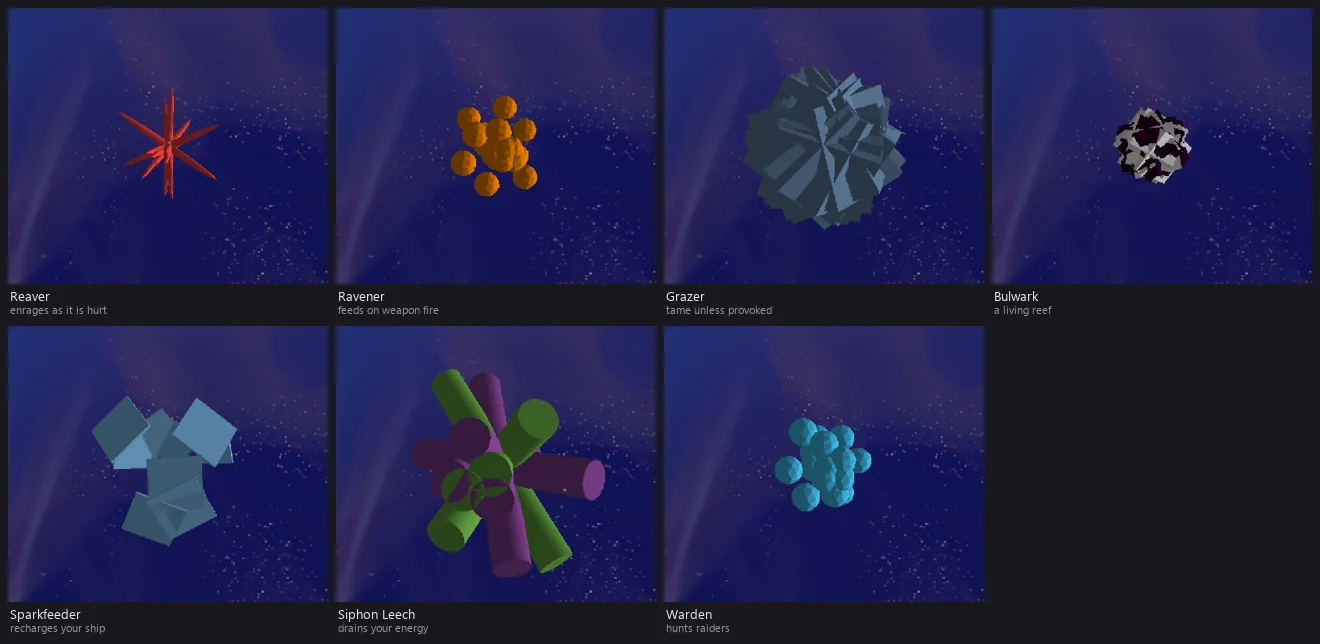
Space monsters are no longer just one hostile Typhon. The Monsters map option now seeds a weighted mix of species — some deadly, some harmless, some that actually help you — and a Game Master can drop any of them from the spawn menu. Scan an unknown creature and its science readout tells you what it is before you decide to shoot.
- Seven new species over one behavior: Reaver (fast hunter that enrages — faster and redder with every wound), Ravener (an apex predator that feeds on weapon fire — beams and torpedoes only heal it; the one thing it can't eat is a black hole), Grazer (a placid drifter that's tame unless provoked, then turns on you), Bulwark (colossal, inert living reef — harmless unless you ram it), Sparkfeeder (a docile creature that recharges your ship's energy), Siphon Leech (its parasitic twin — drains energy, non-lethal), and the Warden (a friendly guardian that hunts raiders, never you).
- Every monster has an age. Individuals spawn Young, Mature or Ancient — older ones are tougher and larger (age never changes the damage they deal), and an aged Ancient eventually seeks out a black hole to die.
- Black holes bite again. Player ships and fighters that drift into a black hole's pull are now reliably destroyed — no more bobbing at the edge or warping free (fixes the long-standing "black holes don't kill" bug).
Authors add a species by dropping in a prefab file over behav_typhon; the roster
and mix live in one weight table.
🪝 Grav-tether
A tractor beam for Weapons and fighters — one system, scaled by hull.
- Weapons hold-click any contact for a context menu: Reel cargo in (it's collected on contact), Tow a ship or derelict at distance, Lock for a rigid grab, or Release. The mode is chosen by what you grabbed. You do not have to target it first - the menu acts on whatever you held the button on, so you can hook a derelict while staying locked on the raider shooting at you.
- Weapons shows what you have hold of. The called-shot square doubles as the tether readout: the load's own silhouette, the mode (TOW / REEL / LOCK), its name and its range. When the called-shot panel is busy with a target, the tow is named along the bottom strip instead - it is never left unsaid. And it says so when the beam is on you: a hostile tether reads TOWED, a fighter on a rock reads SWING.
- Fighters get a cockpit button with nose-aim targeting (it grabs what you're pointing at): reel salvage, or swing around an asteroid on a tether that holds your radius while you orbit. The button glows cyan while tethered.
- Impulse only (the canonical rule): a tether can't hold at warp — it caps you back to impulse, or optionally snaps and drops the load.
The beam now feels the weight
- Tow a starbase. It is slow, it drinks your reserves, and one ship will not get it far — but it moves. A crate still comes in like a crate; a freighter is a real load you feel on the helm; a station is a job.
- Call for help, and mean it. Every ship on the same beam pulls harder and takes a share of the power bill, so four hulls haul a station further than one ever will — not four times harder, but four times longer before anyone runs dry. Weapons counts the crew on the readout: TOW ×4.
- The beam tells you it is struggling. A haul reports light, heavy or overloaded, and an overloaded one says outright that it wants another ship on it. No more wondering why the helm feels like treacle.
- Grav Lock on something enormous pulls you over. Lock a station and the station wins: it winches you across — a steady haul you can watch, not a jump cut — and holds you there, which is a fast way to park.
🔧 Tug rigs
Two ways to make a ship better at hauling, and they stack.
- Heavy Tug Rig — the ship hauls as if it were four. Permanent once fitted, and bought at a station market, not found floating in space.
- Tug Rig Mk I — an early-pattern rig you find out in the world. Two and a half ships' worth of pull, and it burns itself out after ten minutes. Good for one delivery.
Fit both and they add up. Neither changes what your ship weighs, so a rig will not make you harder to grab or make your own wreck worth more.
Weight is honest
Everything on the beam has a mass, and the mass is what a crate looks like it weighs. A canister barely slows you while you reel it in, a fighter can pick one up without being dragged onto it, and a turret kit tows behind a cruiser instead of pulling the cruiser around. The heavy things — stations, capital hulls — are the ones that fight back.
Built on the engine's native tractor.
🛰️ Sensor Beacons & the Fabricator
Engineering has a new job. A Fabricate tab turns materials into gear over a build timer, and its headline product is Beacons — a fabricate-only ordnance the crew builds, hands to the tube, fires, and later flies over to recover.
- A two-console loop, on purpose. Beacons don't come pre-loaded — a ship spawns with zero rounds. Weapons tells Engineering what to build, Engineering fabricates it (spending inputs over a timer) and delivers it to the tube, and only then can Weapons fire it. The coordination is the gameplay.
- Bio Beacons herd the bestiary. Program one to attract or repel a chosen space monster, fire it, and it broadcasts across the sector — baiting a Reaver into a minefield or shooing a Grazer off your six.
- Sensor Beacons — the old Probe, brought forward. The passive sensor-relay Sensor Beacon folds in Artemis 2.8's Probe concept. Ported 2.8 missions that stocked Probes come across as Sensor Beacons the crew can build and deploy.
- Recover and reprogram. Fly over a deployed beacon to add the round back and keep its program; Science can scan any beacon to read what it's broadcasting.
- Recipes are data. Every beacon (and any other craftable) is an AMD recipe — inputs, build time, and program — so a mission adds its own without touching the addon.
Authors: Fabrication & Beacons addon · Porting Probes: Porting from Artemis 2.x.
🎰 The Casino is open
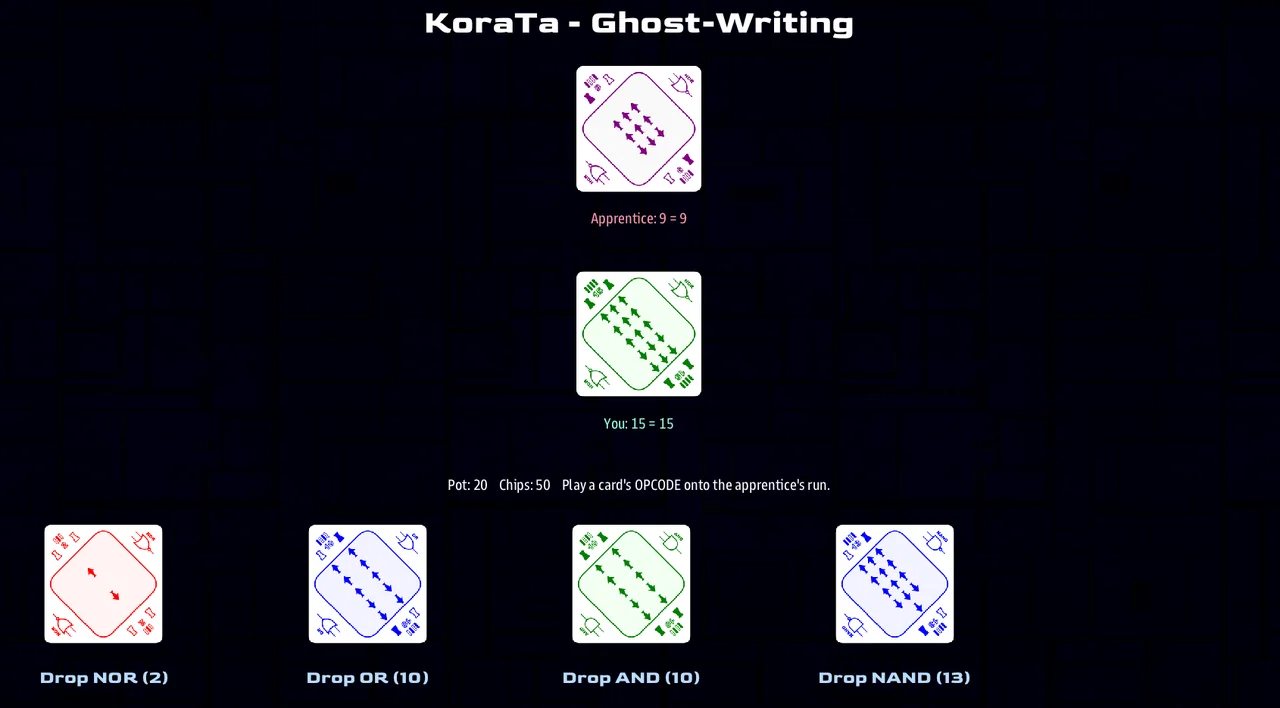
Dock in the hangar bay and step into the Casino — a self-contained hangout that adds a Casino tab to the bay (leave it out and nothing changes). It runs on an Arvonian bit-card deck, dealt in some games by the Understander, their revered master computer.
- Play with chips. Start with a stack; the cage lets you Buy more or Cash Out — buying dips into the crew's shared credits so you can always get back in, and a hot session earns comp chips.
- Eight games, from a ten-second flutter to a full poker duel: Parity (quick XOR bet), Blackjack, Nibble, Gates (bit-card baccarat), Choga, Video Poker, and the new KoraTa — Ghost-Writing, a five-round head-to-head where you play cards as values to build your run or as opcodes to corrupt your rival's (3-bit and 4-bit tables).
- The bar. Toast the room, buy a regular a drink, and ask for a rumor — act on it to see if it pans out. Reliable patrons earn your trust; enough trust opens the grey market.
- Pilot market. Spend your winnings on real ship upgrades and gear — chips first, then side credits.
Play guide: How to play the Casino · Authors: The Casino addon.
🛩️ Hangar
- Sorties for pilots. Pick a fighter or a shuttle and its sortie quests appear under Available Quests, ready to accept before you launch.
- Loadouts as upgrades. Craft loadouts are now deltas over the ship hull — shields and ammo applied through the item/upgrade system — with an image-based cockpit overlay.
- Rearming takes time. A craft's refit now runs longer the more torpedoes it has to reload — every empty tube adds time (tunable per dock), so a bomber that spent its payload turns around slower than one that never fired. Fit the new Torpedo Autoloader upgrade to cut that per-torpedo cost.
See the LegendaryMissions addon reference.
🕵️ Peacetime Remastered — a mission written in AMD
Peacetime Remastered is a border-patrol shift that doubles as a worked example of
authoring a whole mission as data. Almost everything the crew sees — the story, the
job board, the cast, the clues, even the chatter — is declared in one .amd fact-sheet;
MAST holds only the logic that reacts to it.
| What the crew sees | Authored as |
|---|---|
| The Ambassador Florbin kidnapping | a quest tree — take the case, identify the kidnapper, subdue, recover |
| The cast (a deck chief, the Admiral, the Ambassador…) | lifeforms — hosted contacts appear as comms badges you hail |
| The 40 allergy clues | generic AMD records — each heading is a container the ambassador could hide in, its body the clue |
| The Ambassador's passenger complaints | a chatter line-pool — one picked at random |
| Briefings, cargo manifests, interview reports | prose templates filled in at send time |
| Object scans (cargo ships, anomalies) | dialogue-native scans (Scan of: / Tab: / % variants) |
| The patrol quests — gunnery, rocks, poacher, mercy, customs, survey | quests with goals, rewards, and fail triggers |
Pick the quests you want. Each one waits under Available Quests until the crew Accepts it. Accepting is when a quest's clock starts and when its targets spawn, so a timed rescue gives you the full window (the Mayday arrives, then the shuttle) and nothing clutters space for work nobody took. Weapons stays busy in peacetime: qualify on drones, break hazard rocks, and disable — don't destroy a poacher.
Two dials. Quests Offered (none / few / some / max, default some) deals a random hand of quests, so no two shifts offer the same work — and a seed deals the same hand every time. Quest Size sets how big each one is.
The mystery is different every time, and always solvable. One kidnapper, the Ambassador hidden in exactly one cargo hold, and a clue trail laced with decoys — dealt fresh each game, and never dealt into a dead end.
Authoring reference: Quests · Sides, lifeforms & faces.
📋 Available Quests — everything you can take on, in one place
Quests you could take on and quests you have taken on now live side by side, on the same screen:
- Available Quests lists every quest on offer — a mission's patrol work, the sorties for the craft a pilot has picked, and in Open Universe the station work, cargo runs and passengers. Pick one and read it in full, then press Accept, on the consoles that may. Station work in Open Universe says to hail the station instead.
- Quests is what you have taken on — active, done and failed. A quest moves there the moment you accept it.
The Available Quests tile shows how many are waiting, and only appears when there is one to take.
🤝 Peacetime, with more than one ship
Bring a second ship to a peacetime patrol and a single Quest Mode (set on the map panel) decides whether you cooperate or compete for the same board of jobs:
- Co-op — nothing is claimed. Deliver a barge and every ship holding that job is paid, and the multi-step arcs run for the whole crew together.
- Protected (default) — the moment you work a target it's locked to you. A rival's grav-tether is refused ("claimed by another ship") and only you are paid. Friendly by default, nobody can spoil your job.
- Claim-jump — claims are stealable: the grav-tether becomes the competitive tool, letting you tow a rival's salvage out from under them. Payment follows whoever delivers, and each ship banks its own earnings for a top-earner readout.
Who owns a job, who gets paid, and who gets credit for a kill are firm rules rather than best effort — they hold however many ships are flying.
Player guide: Multiplayer jobs.
🛡️ The Siege Map, Refined
- Pick your battlefield size with a new Map Size option.
- Consistent, repeatable maps from phased, keyed seeding (no more surprise spawns inside an asteroid).
- Share the exact setup with per-map seed options and a shareable game code.
- Optional bonus objectives for skilled crews.
- Quests between waves. Peacetime's patrol quests come to the Siege: set Quests Offered to few, some or max and a random hand of rescues, tows, surveys and gunnery drills appears under Available Quests, to take on between assaults. Off by default; the same seed deals the same quests. Quests offered.
- Survive Clock option. Choose what the time limit means: Win = outlast the clock to hold the line, or Loss = break the siege before time runs out or you lose. One dropdown flips a defensive hold into a race against the clock.
💀 Bosses
The Siege can now escalate into a boss that warps in when the raiders thin out — picked from a new Boss dropdown:
- Warlord — a named enemy flagship and honor-guard reinforcements.
- Continuous — endless waves until the clock nears its end, then the attackers break off in retreat for a hard-won defender victory.
- Ragnarok — the renegade "42 Fleet" led by a Terran juggernaut. Beat it outright, or have your comms officer hail XORN and turn one of its captains to your side.
- Infestation — a BioMech swarm that drifts neutral and feeds on asteroids until you provoke it, then wakes as a collective, evolves through four stages, and breeds — with the sentient Stage 4 hailable to calm or enrage. BioMechs are a reusable addon you can drop into any mission.
Bosses are data-driven and folder-scanned — each is a small file in maps/bosses/,
so authoring a new one is just dropping in a file.
Playing & hosting: LegendaryMissions · Authors: Writing a Siege boss.
🗣️ Characters who ask, and leave if nobody comes
A deadline you cannot hear is just a number expiring somewhere. An urge gives it a voice: a condition, a cadence, and a pool of authored lines. Anyone can hold one — a passenger, a station, a whole side — and the closer the clock runs, the more insistent they get.
- The stakes stay in the quest. An urge declares no consequence of its own; it is the voice of a quest that is already counting down. One clock, one place to tune, and deleting the urge costs the drama but not the mechanics.
- The countdown IS the drama curve. Write
%while there is time,%%as it runs short,%%%at the end, andEscalates: with deadlinereads the quest's own clock. The number of markers is the curve;Fails when:is the tempo. Nothing has to agree with anything else. - They know when to shut up. A per-actor floor stops one character monologuing, and a
global floor stops five of them piping up the moment a jump makes them all eligible —
shared with mission dispatch, so nobody talks over the Admiral. Only something urgent
(
Weight: 90) jumps that queue. - A whole station can hold a quest, so a resupply run has a deadline and a cost that lands on the world rather than on whichever ship happened to fly past.
- Standing is a consequence.
Reward:andPenalty:takeearns <faction> <pole> <n>, so finishing a job — or abandoning one — moves how a faction feels about you, not only what it charges you.
In Open Universe, Doctor Voss waits on the docking ring at her pickup, asks more insistently as her window closes, and takes a berth on someone else's freighter if nobody comes. In Legendary Missions, Ambassador Florbin's famous passenger requests are the same character, now five lines of data instead of a hand-written loop.
🤖 Attract Mode — the ship flies itself
Flip on Auto Play (AUTO_PLAY: enable: true) and every bridge runs itself — a
great lobby / attract screen or hands-free demo. The autoplayer doesn't just
wander and shoot; it plays like a coordinated crew:
- Stand-off alpha strike. Against an enemy at range it holds at 5000u, opens with an EMP to strip shields, then a single Nuke, waits for the blast to clear, and only then closes to mop up with beams and homing torps — so it never catches itself in its own explosion.
- Fires only what it has. It reads real magazine counts and launches only loaded types — no more phantom Homing torpedoes once the tubes run dry — and it won't friendly-fire: area torps are held whenever an ally sits in the blast, and wrecks get beams only, never torpedoes. A PShock finishes a target whose shields are down.
- Talks like a crew. It hails enemies to taunt them with the right line — the one an intel scan reveals — demands their surrender once shields drop, and at the start of a match asks friendly stations to build Nukes to keep itself armed.
- Plays engineer. It overpowers drive and weapons for a faster, harder-hitting ship and balances the heat with coolant, easing off when energy runs low.
- Survives sensibly. It flees lethal terrain — steering clear of a black hole's pull well before it's caught in the well — docks to repair when hurt, and if its maneuvering is shot out it holds station to keep fighting instead of burning off into deep space.
- Goes home when the tank runs low. A ship short on energy breaks off, flies to a friendly station, docks, and comes back out fully fueled with its shields up — so a lobby left running all evening still has ships flying at the end of it.
Turn it on — and tune its stand-off range and engineering overpower — in LegendaryMissions settings.
🎬 The Director — stream your game like a broadcast
Cosmos looks best from outside the ship, and a stream of it is only as good as the shot it is on. The Director is a console for cutting that stream live: build a list of shots, see the next one before it goes out, take it to air when it is right.
It never takes a crew seat or a mainscreen. You open extra clients and tell each one
what it is — Program (what the stream shows), Preview (the shot before it goes
out), or the Director itself. Each screen names itself PROG01, PRE01, DIR01,
so four windows are told apart at a glance.
- Two feeds. Every Program screen shows the same thing; every Preview screen shows the same thing; the two are different. Open a second Program window and it stays in step with the first, so you can capture one and project the other. Preview is where you check a shot before the audience sees it — and it follows the editor live as you build.
- Rundowns are the running order. Four are built from the live game every time they are used, so they never go stale: Bridge wall (a multiview of every console), Player ships, The action (whatever is most exciting right now), and Stations & terrain. Build your own beside them.
- The shot on air is green, and so is the rundown holding it, so a collapsed branch still says where the show is.
- Two ways to cut. Tick rundowns and press Send to Program to let it run on a dwell — or flip to Items and click a shot to put it on air the instant you pick it, like a clip launcher.
- The same shots the bridge has. Dolly, Orbit, Chase and Tactical are the science and weapons On Screen vocabulary, framed off the ship's own hull size — so a Director shot and a bridge shot of the same ship are the same shot. Chase is the Director's own addition: a third person that rides behind a ship as it turns.
- A shot can hold for as long as it deserves. An establishing shot of a starbase can ask for ten seconds where a chase in a firefight wants three; everything else follows the dwell.
- Let the game direct. The auto-director ranks by the same signal the engine's own cinematic camera follows, holds its choice through noise, and falls back to your running order in a lull.
Titles that write themselves. Lower thirds, hero cards, a top status bar and a letterbox — and because a generated rundown makes one item per ship, the text is a template filled in from whatever the shot is pointed at:
name:  <<name>>          ->   Artemis
line:  <<class>>         ->   Light Cruiser
<<side>>, <<role>>, <<race>>, <<comms_id>>, <<hull>> and <<shields>> too,
with <<class|contact>> to say what to fall back to when there is nothing to give. Each
row has presets, and a Save to add your own.
Docs: The Director.
🎛️ Tablet control panels — a real throttle lever (experimental)
Put a tablet beside the helm and give it a throttle you can grab. With TouchOSC (or any app that speaks Open Sound Control), a phone or tablet becomes an extra panel for a console: an impulse lever with a REV switch and warp in four steps, a big red-alert button, shield and dock buttons, power faders for engineering, torpedo fire buttons for weapons — and live gauges for shields, energy, heat and torpedoes left.
- It follows the ship. Move the throttle at the real helm and the lever on the tablet moves with it. The gauges update a few times a second.
- It sits beside the consoles, not instead of them. The consoles stay the main screens; the tablet adds the physical feel.
- Ready-made panels.
sbs osc layout allwrites a TouchOSC layout for each of the five consoles. - Off unless you turn it on - it opens a network port. Launch LegendaryMissions with
profile=osc, point the tablet at the server machine, and play.
Experimental: only the helm panel has been tried on a tablet so far, and a few console controls — loading tubes, starting a scan, jumping — are out of a panel's reach for now.
Docs: OSC control panels.
The things you already do, done better
Everything in this part is something you already had, met again. A few change what your game looks like whether you ask for them or not.
😐 New faces, and faces that move
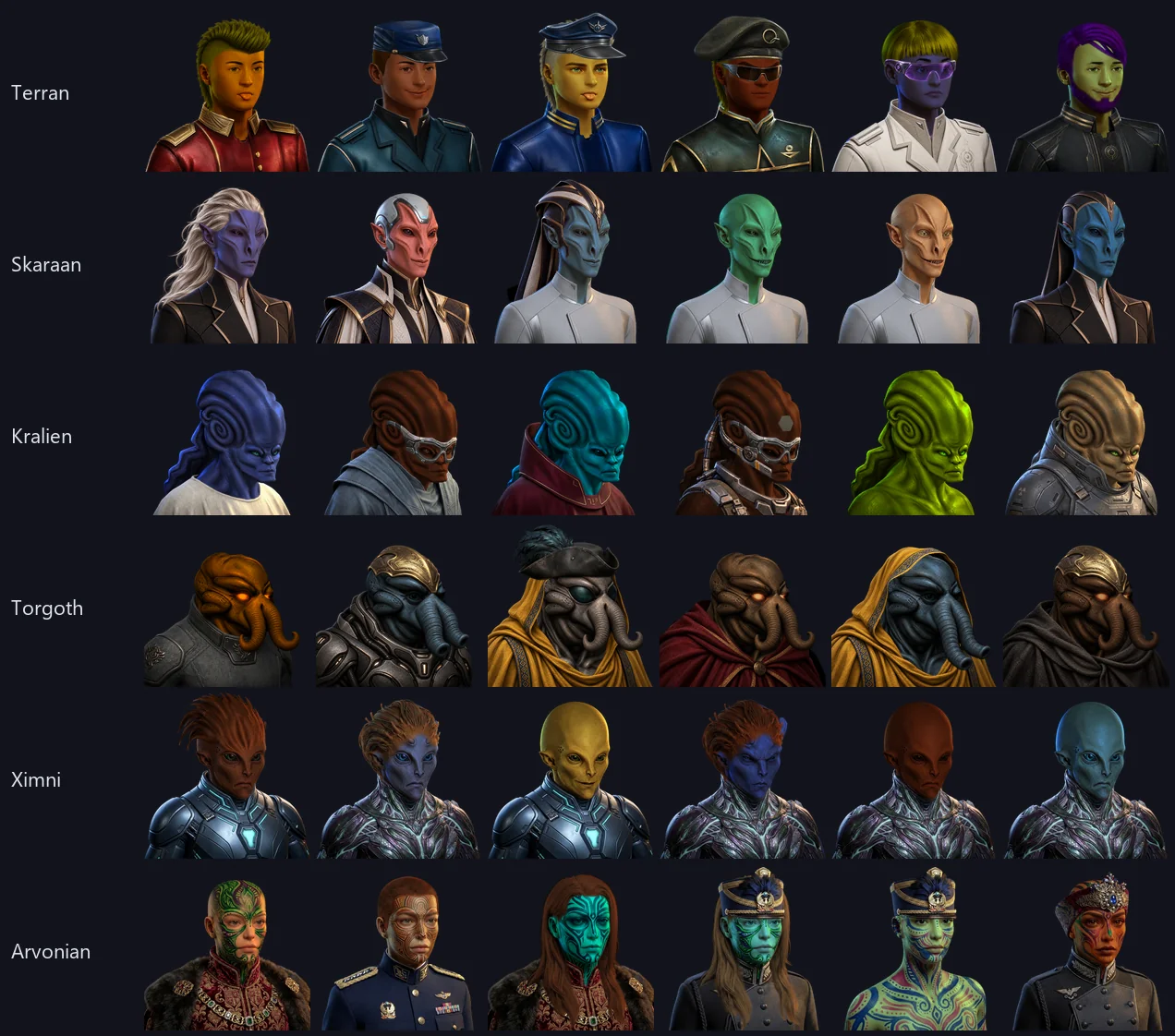
Every character portrait in the game has been redrawn. All six species - Terran, Torgoth, Skaraan, Kralien, Ximni, Arvonian - are new art: more hairstyles, far more clothing, glasses, headsets, rank insignia, breathing masks, and eight painted Arvonian busts instead of one.
Faces have expressions now. A Terran comes with fourteen sets of eyes and fourteen mouths - angry, worried, a sideways glance, an eye-roll, gritted teeth, a smile, eyes shut - so the officer on your comms screen can look like they mean it. A mission can ask for one by name, and everything else about the person stays exactly as it was.

And they can talk. The mouths include the shapes speech is made of, so a face can be animated while a line is delivered, and blink while it is not.
Eye color is real. Green, amber and blue eyes are drawn rather than tinted - on Terrans, Kraliens, Skaraans, Torgoth and Ximni alike - and the avatar editor offers them by name. Hair is drawn in neutral gray, which means hair color finally works across its whole range instead of fighting whatever color the hair was already painted.
Skin comes in more than one color. Every species now varies, and the range runs well past human: emerald, jade, ice blue, cobalt, rust, crimson, ashen and amber sit alongside the flesh tones, and any of them can land on any race. Hair has its own range the same way.
The avatar editor says what you are looking at. Short lists - which body, which mask - are dropdowns; the long ones are a slider with the name written beside it, so dragging through thirty-nine skin tones tells you which one you are on. A new face starts with a neutral expression.
And there is a Randomize button. It keeps the species you picked and rolls everything else - face, hair, clothes, color. Hit it until you see somebody you like. If the mission says your console wears a uniform, a roll will not put you in a suit and tie.
One thing to know: the new sheets replace the old ones, and the old art is gone. Faces written into missions have been translated to the nearest equivalent, and a face you built yourself is translated once, automatically, the next time you play. It will be the same character - same species, same build - redrawn. It will not be pixel-for-pixel the person you last saw, because the art underneath it is different.
Docs: Faces.
🪪 The console picker says who you are about to be
The first screen of every session used to offer an empty Crew person Name box. Almost nobody filled it in — and a name was only worked out after the console was chosen, so the one screen where you decide what to be was the one screen that could not tell you.
It shows you instead. The face and the name sit on one line and follow whichever station is highlighted in the list: run down helm, science, engineering and the line changes with you. Highlight engineering on a hull whose mod brought its own cast and it names that ship's engineer. Nothing is written while you look.
A name belongs to the seat, not to whoever sat down. Helm on the Artemis is the same officer every time anything asks — before anybody connects, while you are only looking at it, and after whoever was there gets up. So what the picker shows you is what the console will actually get, and a station nobody is at still has somebody's name on it. One consequence worth knowing: moving from helm to weapons renames an automatically named player — you stopped being the helmsman and became the weapons officer, which is what a cast list has always done. A name you typed yourself is yours, and is never overwritten.
One button, marked "Edit", opens the whole person: your name, your avatar, and the option to be somebody out of the ship's roster.
Editing one thing keeps the others. What you choose is laid over the identity the ship had for you, one field at a time: naming yourself keeps the face the ship gave you, building a face keeps your name, and renaming a cast member keeps their rank and their station — the same officer under another name, not a stranger who took the chair. A face and a photograph still displace each other; they are two answers to the same question.
Faces agree with their names, and wear a uniform. A face is rolled for anybody who has none of their own — from the gender their name declares, and in the ship's uniform, so the bridge looks like a crew rather than a room of passengers.
The TSN Watch is forty people. Seven name a station and the rest float, so a ship with a dozen consoles open, a second science station and a hangar full of pilots stays inside the cast instead of falling through to automatic names half way down the ship.
The ship list on that screen also offers only the ships that will actually fly — picking a hull that was about to be parked out from under your console is no longer possible.
Docs: Crew rosters.
🔧 Engineering has something to do between the hits
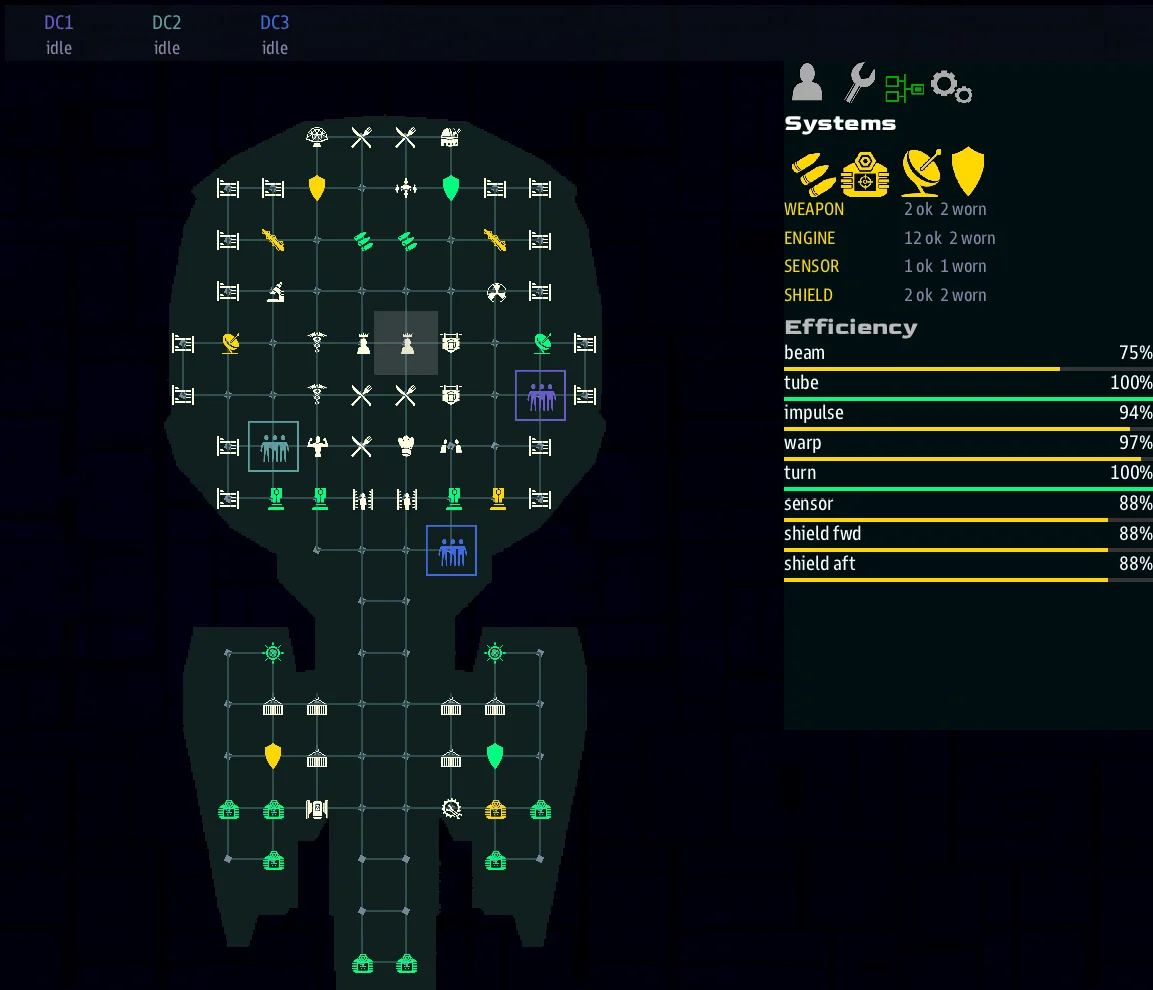
Damage control was binary: a room was broken or it was fine, and the only thing that ever changed it was taking a hit. Systems now have condition as well as damage — and Engineering has a panel that shows it.
| Tier | Drawn | Worth |
|---|---|---|
| Damaged | crimson | nothing |
| Worn | gold | 75% |
| Nominal | its own color | 100% |
| Tuned | cyan | 110% |
A damage-control team patches a room; it does not rebuild it. A room your teams put out comes back worn — in service, drawing gold, giving three quarters of what it used to. Only a dockyard repair makes it new again. So the ship that leaves the second fight is not the ship that went into the first, and that is now something the crew can act on rather than something they just live with.
Wear does not only come from being shot. Firing a beam wears the beam that fired; launching a torpedo wears the tube — charged on the shot, because a torpedo that missed wore it just the same; a hit wears the shield facing that ate it. And everything ages on a slow clock, the drive you are actually running included. Warp is about five times harder on a ship than impulse.
Tuning is what a well-run ship gets for it — and somebody has to order it. Send a team to a system that is fine and they bring it above spec: a tuned beam pool fires at 110 percent. Nothing tunes itself, and nothing is tuned by a team merely standing in the room. It is a job you assigned.
The order is two clicks now. Picking a damaged or worn room in comms used to grow two buttons per damage-control team — eight or more on a three-team ship, with the one you wanted buried in them. It is one button, Repair or Tune, carrying how many teams are already on it, opening a submenu of who to send, who to call off, and how urgent it is. Raise a job to critical and the team turns around once: the choice is committed, so two orders can never trade a team back and forth.
Engineering's right column is a four-tab panel, in place of the oversized crew face that used to hold it (and that was also the thing that collapsed at 1280x720):
- Selected — the room or team you picked on the interior view, described in full.
- Orders — every work order on the ship, highest priority first, with raise and close on each row. Only live jobs are listed: one another console has finished is off the list before you reach for it.
- Systems — the four pools, and the eight efficiency numbers the grid has always derived and Engineering has never been able to see: beam, tube, impulse, warp, turn, sensor, and both shield facings. Each one wears its tier's color, so the pool that is hurting is findable without reading all eight.
- View — how the interior draws its rooms and systems, icons or shapes, one press each. These used to live on a pad you had to find on the map and open two menus deep; they sit beside the view they change now.
And the whole console is built for a finger. Every control you actually press is a real target: the orders under your selection, the preset bank along the bottom, the panel's own tabs. The orders list scrolls, so a room that offers nine things to do shows you nine — where a long menu used to simply stop at the bottom of its box with nothing to say so. Ship data, the heat bank and the power sliders all grew, because the band of empty console between them is gone.
Your damage-control teams are a row of chips above the interior view — name, and what each one is doing right now, in the team's own color. Tap one to select it; it is the same selection as clicking the figure on the map, so the panel and the orders follow either way.
Engineering reads its own screen, so a short display shows three orders at a time and a tall one shows five, and the panel above takes whatever is left.
The cockpit's system lights read the same model, so they show the wear tiers too.
A mission that never opts in sees no change at all. An untouched system reads as
nominal and weighs exactly 1.0, so effectiveness comes out identical to the
undamaged / total fraction it replaced — and because wear sits on top of
undamaged rather than replacing it, an all-worn ship still cannot explode. Every
threshold and rate is a dial: grid_set_wear_tuning(tuned_bonus=0.0) gives you
maintenance with no over-unity, upkeep_rate=0 turns off time-based wear entirely.
The small print, so none of it surprises you. A gym, cargo bay, hatch or airlock is not a system: it never wears and never needs tuning, but it can still be hit, and a repaired one goes back to its own color. A tune that has worn off stops being paid for, so beams sit at 110 percent only while the tune lasts. A team sent to a job walks to it, and any console can take that job over. And the sick bay now heals a team all the way — a team that had taken a single hit healed nothing at all, and Engineering said "visit sickbay" forever — while an uninjured team is left alone rather than parked there.
Docs: Work orders and maintenance, Damage.
📻 The text waterfall grew up into the ship's log
Every console gets this, with nothing to opt into. The waterfall did one job — show the last few lines — and did it with its hands tied: the engine never wrote to it, script could not control its background, and no mission could style it. It is now a proper log, in two halves fed by one record:
- The strip — one line, the newest message, right where the waterfall used to sit. Always visible, no interaction, read at a glance.
- The tab — everything the waterfall used to lose. The full history in the info panel: scrollable, and filtered into Log, Ship and Mission.
Newest is first in both, so the latest line never moves.
You write to it exactly as before — comms_broadcast(...) — with two new optional
arguments: category picks the tab (everything still shows in Log, so a filter can
never hide a message), and severity (tip / warning / danger) renders the line as a
colored callout.
Everything a mission says is kept. overlay_toast(), the toast <text> quest
directive and announce(level="status") / level="minor" all write a log line, so a
console that connects a second later can still read what was said. Only the levels that
are meant to interrupt draw over the view.
Nothing seizes the console. An urgent line does not switch the info panel to the log
tab — the strip already shows it, in its severity colour, everywhere. A mission that wants
the interrupt sets RAISE_ON = ("danger",).
A message names the person who spoke, not the ship they are standing on. When one of your officers hails another bridge, it arrives from that officer — by name, with their face — rather than from the hull they happen to be aboard. The log files each exchange under the person at the other end, so two crew members on the same ship are two conversations instead of one pile filed under the ship, and the direction of each line is drawn for you instead of being spelled out in the title.
Docs: Messages & the ship's log, Overlays.
💾 Your setup survives a restart
Restarting the mission put every option back to settings.yaml — player ships,
difficulty, terrain, the lot. After an early death, or with one setting to change,
that meant retyping the whole screen. Two ways not to, for two different needs.
Save a preset. Build the setup you want on the server console, type a name beside the Presets dropdown, press the save icon. It is in the dropdown afterwards, restart or no restart — and it brings back the crew's ship names and hulls as well as the options. Presets are per map.
Or let it remember. RESTORE_LAST_SETUP: true brings back whatever the last
game started with, per mission and per map, with nothing to press. It saves when
a game starts, so a crash or a quit still leaves it recorded.
It is off by default, and that is deliberate: a convention or venue machine wants every group to start from the same known state, which is exactly what it already does. Turn it on for a crew replaying the same match.
Loading a saved setup puts those ships straight on helm's picker, so helm can still change one and the change sticks.
Where it all lives now
Saved setups are written to data/missions/common_data/, beside the
missions rather than inside one — so updating or re-extracting a mission
keeps them.
📜 The Quest Log says something new
A quest log row says two things in one glyph: the shape is what the thing is — job, objective, beat, arc — and the color is what state it's in, so a caption never has to repeat what the icon already showed.
The second line has to earn its place. It says how far along you are (2 of 6), what a
job pays while it's still a choice (Reward: 120 credits), or how long is left
(1:30 left) — and falls back to the state only for Done and Failed, where the
state is the news.
Quests written before kinds existed still render; they just say less. And because every glyph is asked for by name, a mission that ships its own icon sheet re-skins the whole log without touching a line of it.
📊 Readouts you can read at a glance
Numbers that were really levels are now drawn as levels: a label, the value, and a bar under both, in the same look as the engine's own ship-status panel.
- Engineering's Efficiency is eight bars, in the grid's own colors - cyan when a system is tuned above 100, green, gold, then crimson - so the system that is hurting is the short red one, not the fifth number down.
- Science (the new Science console) shows shields as bars that still say the number you read out loud, the enemy's four systems as a two-by-two block of bars, and each shield frequency as its own bar - with the weakest still called WEAK in words.
- Quests. Pick one and its facts come first: how far along as a bar, its state, what it pays, how long is left - then the story. A story arc's steps are ticked, crossed or marked in progress, and steps the story has not revealed still stay hidden.
- Help links to itself. "Ask Engineering" now goes to Engineering: follow a link in a Help page and the page and the topic list both move there.
- Fabricate says why you can't build. Each material shows what you have against what the recipe needs - red when you are short - and a running build has a progress bar.
- An upgrade's effect drains as a bar while it lasts, labelled with the time left.
- The handheld's Scan reads a room's condition as a colored pip and its wear as a bar, and the same reading lands in the Survey log. Crew shows the face of whoever you pick and how hurt they are, as a health bar, and the "On the surface" list puts a face beside every name.
- Letters come from someone. A message from a character in the story - the admiral, a crewmate - opens with that person's face beside their name.
Mission writers get all of this in their own text: see Gauges and Rich text areas.
🧭 Quests & Stories
- A signal-driven quest engine with kill / collect / scan / dock / reach / arrive triggers and real rewards — all authored in simple AMD files.
- A proper Quest Log you can accept and abandon quests from.
- Multi-step bridge stories that unfold a step at a time.
- Quest-driven end-game. A mission is now a tree of quests — a parent mission
with children marked required (must finish to win) or fatal (fail one and the
game is lost). Quests carry a Win: / Lose: outcome and a
Fails when:trigger (a signal fires, a target dies, a timer expires), so the whole win/lose condition is authored in AMD, not hand-wired in script. The Siege bosses hang their objectives on the siege's mission tree withPart of:. - A quest log that isn't a spoiler.
Show:says when a quest is listed, apart from when it runs — so a story beat can drive its event unseen and appear once it has happened. A converted 2.8 mission went from 48 rows of story to 9: the six things the crew can act on, and history accruing underneath.
Docs: Quests.
💱 Items & Upgrades
One pickup can be worth several units. item_spawn(key, x, y, z, qty=24) stamps a
quantity on the pickup and collecting it credits the lot — so a job wanting 24 salvage is
a crate to fetch, not 24 collectibles scattered across the map. Pickups that don't ask for
a quantity are unchanged.
- Discoverable items and upgrades driven by a data registry — collect them in space and activate them through a generic Upgrades GUI.
Docs: Items & Upgrades.
🏆 Game Results & Scorekeeping
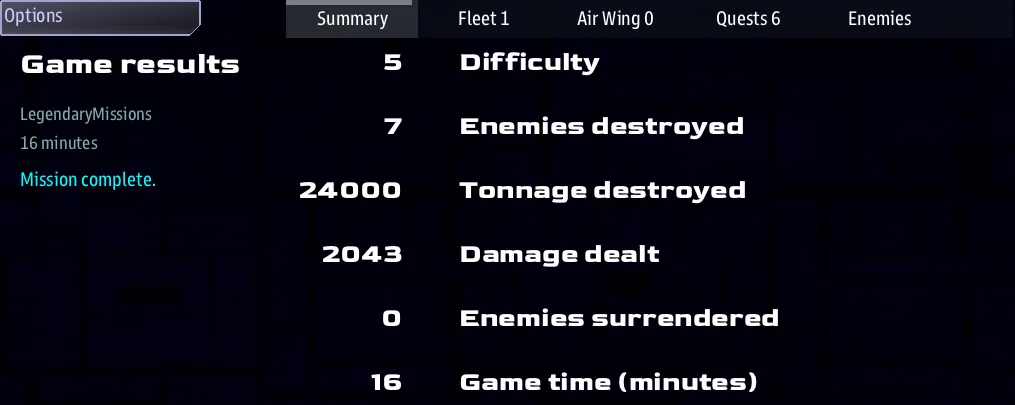
The end-of-game screen is now a tabbed results board with real scorekeeping — built for bragging rights, and for running a scored event.
- Five tabs: Summary, Fleet, Air Wing, Quests, and Enemies.
- Objective scoring. Every kill is credited to the ship (or pilot) that landed
the final blow, and tallied three ways:
- Kills — enemies destroyed.
- Tonnage — naval-style "tonnage sunk," scaled by each hull's size, so bigger kills are worth more than swatting fighters.
- Damage dealt — raw impact, so crews who soften targets without stealing the kill still show up.
- Fleet ranks each bridge ship (kills / tonnage / damage / hull remaining); Air Wing ranks each fighter & shuttle pilot by call sign (sorties / kills / tonnage / objectives). Bridge and cockpit credit never double-count.
- Every game is saved to a rolling history — with an even denser per-ship / per-pilot / per-quest breakdown than the screen shows.
Running a tournament? — for Convention Operators
Pair the scoreboard with repeatable seeds and a shareable game code: hand every crew the same code and they all play the identical map and enemy layout, then rank them by their Fleet / Air Wing boards (kills, tonnage, damage) for an objective result. The Director gives you a spectator / big-screen view for the venue floor.
Details: LegendaryMissions › Game features.
🤝 Friend or Foe — decided by Diplomacy, not by labels
A deep pass reworked how the game answers one deceptively simple question: "is this
ship a friend or an enemy?" It used to be answered by hardcoded role labels —
raider meant "the bad guys" and tsn meant "the good guys" — an assumption quietly
baked into targeting, victory checks, docking, comms, loot, and quests. Now those
questions are answered by diplomacy: the actual side relationships. A side's
name no longer decides its allegiance.
What that unlocks:
- Runtime ceasefires & alliances that actually stick. Negotiate peace with a hostile faction and it really stops being a target — your fleets break off, its ships stop counting as "enemies remaining," you can claim its systems, and killing it no longer pays a bounty. Ally with a faction and its bases count as your friendly bases.
- Many enemy factions, not one lump. Enemies can field their own faction sides, each independently at war or at peace — instead of everyone sharing a single "raider" side.
- More than one player side. Co-op or rival player factions work without
assuming everyone is
tsn: friendly stations, escorts, and win/lose conditions all derive from who the players actually are. - Quests that mean "enemies," not "raiders." A kill objective can be authored as
destroy N enemies— faction-agnostic and ceasefire-safe — right alongside the familiardestroy N raiders.
For authors it arrives as a symmetric sides & diplomacy vocabulary — ask
side_are_enemies / side_are_friendly, or grab the whole set of what's hostile (or
allied) to a ship or to the players — so you never hardcode role("raider") or
role("tsn") again. Every stock single-side mission plays exactly as before; the
new reach is there when you want it.
Docs: Sides & Diplomacy.
🚢 Fleets, written down at last
Fleet ladders became per-race data in v1.4.0, but how you actually spawn one was folklore.
Now documented: Fleets & raiding — prefab_fleet_raider, what a
variant is, per-faction sides via faction_side, and the difficulty encoding, which has two
forms nobody guessed:
| You pass | You get |
|---|---|
0 |
the mission's DIFFICULTY setting |
200 |
DIFFICULTY + 2 — a relative offset |
🏷️ Icons have names now
gui_icon("icon_index:111;") asked you to remember that 111 is a wanted poster. Every
one of the built-in sheet's 176 glyphs now has a name, and there is one call that
takes one:
gui_icon_name("quest.job", "#cc0")
Two kinds of name, and the difference is the point. A look — square, bell,
wanted — is what a glyph is. A meaning — quest.job, quest.state,
list.expand — is what it's for, and points at a look. Ask for the meaning, and
re-pointing it changes every screen at once.
The same names reach your own art. Register a cell of your sheet under a look and it wins over the built-in one:
gui_icon_add_atlas("wanted", media_shared("icons/quest-sheet"), 0, 0, 64, 64)
Every gui_icon_name("quest.job") in the game now draws your art — with no edit to the
code that draws it. Screens can be written before their art exists, and an add-on can
re-skin screens it doesn't own. An unknown name draws nothing rather than a plausible
wrong glyph, because a wrong icon looks deliberate.
Claiming a look is deliberate: only the icon domain re-skins, so an ordinary image
that happens to be called square or flag can't silently change every state pip in the
game.
Or write the sheet as a fact sheet. An ## [Icons] section registers the same keys
with no Python — the sheet, the cell size and the domain are written once on the section,
so an entry is a single line:
## [Icons](icons)
---
icons
Sheet: icons/quest-sheet
Cell: 64
---

### [Job](wanted)
---
At: 0, 0
---
The same section type registers any atlas, not just icons — a card deck or a set of
console backdrops is the same format with a different word (images, art) and its own
Domain:. sbs lint checks them: a sheet that isn't on disk, an At: with no Cell:
to measure against, a cell off the edge of the sheet. Each of those draws a blank widget
in the game and says nothing, so the lint is where you find out.
The whole named set, with pictures: Icons by name.
🗂️ Console tabs stop drawing over each other
The tab strip divided a fixed width evenly, so more tabs only ever meant narrower tabs — and the engine does not clip text, it draws it anyway, over the neighbour. Every tab was present, clickable and illegible, which is why adding a tab broke ones that already worked.
Eight tabs are shown; the rest go behind a More (N) menu that behaves exactly like
clicking a tab. BACK is never overflowed. Nothing to configure.
⚡ Smoother with big fleets
Large battles used to stutter on a beat. Every few seconds the game processed every NPC brain in a single frame — then, on another beat, every mission objective — so the frame time spiked periodically. The bigger the fleet, the bigger the hitch.
That work is now spread evenly across frames. Each brain and each objective still updates on the same schedule as before — the AI is exactly as sharp and reacts just as fast — but instead of one big burst, the load is smoothed out tick by tick. On a busy Siege those periodic frame spikes are largely gone, and it scales far better as fleets grow. Nothing to configure; every mission gets it automatically.
For tinkerers — how it works
Per-tick work that iterated a whole set at once (all brains, all objectives)
now runs a rolling slice each tick, sized by a shared RollingSlicer so a
full pass completes in its declared period regardless of set size or tick
rate — no batch spike. The slice is sized by the elapsed tick count, not by
how often the host happens to call it (the engine makes about 15 calls a
sim-second, the headless runner 6), which is how TickTask has always measured
its own delay. If you're chasing a mission_tick that
overruns its budget, the engine's Elapsed time log line now prints a
per-phase breakdown (dispatch_tick / gui_present / gc / …) so you
can see exactly which subsystem caused a given spike.
A fleet whose last ship is gone stops being a fleet. Every wave, every fleet a gamemaster puts together and every fleet-of-one a spawned raider builds used to leave an empty one behind when its ships died — for the rest of the run, each still thinking away with nothing left to command. They are cleared up now, a few seconds after the last ship goes. A mission that deliberately holds an empty fleet keeps it.
🎬 Quality-of-Life & Presentation
- Shareable game codes and per-map seed options so crews can replay the exact same setup.
- A nebula is the color it is named. Three of the seven stock colors were not:
yellowcame out chartreuse and read as a second green, andredandorangewere a single indistinguishable dot wherever a map carried both. The clouds themselves were retuned rather than just their radar icons — the icon is drawn from the cloud, and the two are not allowed to disagree — so nebulae genuinely look different now in any mission using the stock colors.
Details: LegendaryMissions › Game features.
🗂️ One profile for every mission
A profile is one named file that decides how a mission runs —
its settings, its add-ons, its art packs. Put it in data/missions/common_data/profiles/
and it applies to whatever you launch, so one file serves every mission and survives
updating any of them:
sbs run server,science,comms profile=a28_skies -m WalkTheLine
That is a full profile, add-ons and art packs included — so the Artemis 2.8 skies
follow you into any mission, from one file. A mission's own profiles/ folder
still wins if both have the same name, so a mission can ship a definitive one.
Launch arguments know which mission they were for. profile=, map=, console=
and var.NAME= belong to the mission you launched: restart into a different one and
they stop applying, and the log says so, rather than a same-named profile over there
meaning something else entirely. seed=, run=, record= and test= describe the
launch itself and still apply. See
Switching missions.
Sharing a game code does not share your ship names
A game code is for replaying an identical match, so it carries the map, size, seed and options — and not your crew's ship names, which are not part of the match and made the code several times longer. A setup you save does carry them.
Writing a mission
For anyone building one. The short version: far more of a mission is now something you write down rather than something you program.
✍️ AMD — write the mission, don't program it
AMD is the new way to author content: a mission's jobs, characters, places and story beats are written as plain fact sheets, in the words you would use describing them to someone. No script, no wiring — you say what a thing is, and it behaves that way.
A record says what it is, and that decides how it behaves. A Beat is a moment the
crew lives through — it runs unseen and appears in the log once it has happened, as
history. A Cue is a stage direction: it fires and is never listed. An Arc is the
heading over a run of beats. A Job is taken by a ship; an Objective is the crew's.
The word you choose carries the rest:
# [The Coils Overheat](ramscoop/coils)
---
Beat
Done when: signal ramscoop_online
---
Engineering reports the coils running hot.
One grammar answers three questions. Starts when: / Done when: / Fails when:
all take the same thing — signal X, destroy 6 raiders, reach 6, 4, 5 minutes,
all dead convoy, accepted, revealed. Learn it once and you can say when anything
opens, finishes or fails.
Reward: and Penalty: say what a job pays and what failing it costs — so a timed
job with something at stake is two lines.
Traits — what a record ALSO does. A worldlet is a Landmark that happens to yield ore; that second half is a trait, not a new kind of thing:
Landmark
Also: economy
Yields: ore 8
Reserve: 4000
Two traits ship: economy (Yields: Reserve: Price: Costs: Time:) and
reputation (Values: Standing: Reliability: Rival when:). A Side and a
Character are always regarded some way, so they carry reputation without asking;
Also: is for the optional half.
See The AMD file format.
🎞️ AMD prose reads like a screenplay
The fact sheets were only half the file. The other half is the prose, and it learned six marks — borrowed from Fountain, the screenplay format, and Obsidian, where linked notes come from. A line the format does not recognize is still prose, always, so nothing you have already written changes.
A scene can hold a conversation. The speaker's cue goes in the body, the way a script writes it, so one scene carries as many voices as it needs:
@Ashfang
% You're a long way from friends, captain.

@Vell (comms)
(shaken)
He means it, captain.
(shaken) is how the line is delivered — write anything you like. (comms) is where
it is delivered, so who-says-what-and-where is decided in the script instead of in code.
Prose can point at things. Talk to [[cmdr_vell]] before you reach
[[ds1|the station]]. These are real references, so Find All References, Rename and the
Story Graph all see them — and a link to something you have not written is not an
error:
$ sbs lint <mission> --missing
3 thing(s) referenced but not written yet:
  cmdr_vell
      linked from `brief`   story.amd:6
Draft the whole mission as prose, link freely to scenes that do not exist yet, and let the linter hand you the list of what to write next. In the editor each one gets a Create this record quick fix.
And three smaller ones. = a note to yourself records what a beat is for — it
shows in hover and the outline and never reaches a player. /* ... */ cuts a scene
without deleting it. > [!WARNING] gives an in-fiction document in-fiction formatting.
In a cutscene, FADE IN: and > CUT TO: say how a shot arrives without appearing on
screen — so a cutscene file reads as a screenplay and is still the shot list the engine
plays.
See Writing the body.
💀 Drops: — what a kill leaves behind
Loot is authored now, keyed by role, because what a ship drops follows from what it is:
### [Raider](raider)
---
Drops: salvage x2-4, contraband 20%
---
The defaults stay the defaults — a mission that authors nothing behaves exactly as
before. What changes is that an author can see the answer and change it, instead of a
condemned hulk on a live-fire range leaving contraband because it happens to be spawned
hostile. Drops: none means this one drops nothing, which is not the same as having
no table at all, and sbs lint flags a drop key that names no item.
See What a kill leaves behind.
📍 Markers — naming a place
"Clear the asteroids in the shipping lane" needed the crew to know which asteroids, and
prose written at authoring time could only name coordinates that go stale. So put the
place in the world instead: marker_area for a region, marker_point for a spot,
and marker_object for a spot the crew has to select.
See Naming a place.
⏳ A deadline you can hear coming
A job with a Fails when: clock calls in as it runs down, on comms, rather than
counting itself out silently on a tab nobody is looking at. Marks are absolute — 5:00, 2:00, 1:00,
0:30 — filtered to the ones that fit under the deadline, so a six-minute job gets four
reminders and a forty-five-second one gets two.
Who speaks is whoever the job asked for: Speaker: outright, else Held by: when it can
talk (a station's job speaks with the station's face for free), else the mission's
registered dispatch voice — and silence if none of those resolve, because a reminder
from nobody is worse than no reminder. Signal says: gives it words, with {time}
interpolated, so an automated beacon sounds like one:
Speaker: shuttle_pilot
Fails when: 6 minutes
Signal says: LIFE SUPPORT CRITICAL. {time} TO FAILURE.
See Deadline reminders.
📞 A beat that opens with a call
The reason hails matter for authors: somebody calling is a natural way to hand out work, and taking the job is what you say back. Both halves are AMD.
#### [Take the Case](brief)
---
Scope: shared
Starts when: revealed
Action:
  - ds1 hails ds1_brief
Then: reveal florbin/trail
---
### [DS 1 Briefing](ds1_brief)
---
Speaker: ds1
When: hail
Title: Ambassador Kidnapped
---
Ambassador Florbin was taken off this station inside a cargo container.

- [Take the case]() ; completes florbin/brief
- [Not now]()
The scene carries the words, the title, the portrait and the recorded line, so the beat
only names it. Written bare — ds1 hails — it opens that speaker's When: hail scene.
Who gets called follows Scope: and you never say: a shared beat calls every player
ship, a per-ship beat calls its own.
What an answer means is written on the answer: accepts, completes or fails a
quest, or signal for anything those three do not cover. It is resolved on the server, so
it happens exactly once however many consoles are connected — no //shared/signal route
to write, and no guarding against two officers pressing at the same moment.
Peacetime's Florbin case opens this way — the whole exchange is authored, with no hand-written MAST behind it.
Three smaller things came with it. At start: posting lists a quest without a working
Accept button — a board you take by answering the call that offers it, not by pressing a
button. Then: signal X now reaches other quests' Done when: signal X, which is what
those two lines always looked like they did. And a mistyped scene key, an unknown outcome
verb or an unrecognized Then: word are all lint findings now, instead of a beat that
quietly does nothing.
🎭 Overlays — cards, HUDs & cutscenes on top of the view
A whole new overlay system for drawing on top of a console's page and its live 3D view — chapter cards, notifications, a modal choice, a live HUD — that update without repainting the page underneath.
- One-liners for the whole toolkit.
overlay_hero("CHAPTER TWO", subtitle="…")for a scene title (with a face, ship, icon, or image);overlay_lower_third(name, line)for someone speaking over the action;overlay_banner,overlay_toast(toasts stack — several coexist, each clearing on its own),overlay_letterboxandoverlay_flashfor a cutscene,overlay_credits(..., roll=)for rolling credits. - Aim it anywhere. Every overlay takes
to— the current console, one client, or a role set:overlay_hero("FLEET ALERT", to=role("mainscreen")). Server story logic pushes straight to the players, or fires it with a one-line//shared/signalbridge. - A modal that returns a value.
result = await overlay_choice("Fire?", ["Yes","No"])— a full-screen card you can await, resolving to the button they pressed. - A live HUD over the view.
overlay_hud(rows=…, controls=…)floats a sticky panel over the 3D view;overlay_hud_updaterefreshes just its values, no repaint. - Author overlays as data. Declare them in an
.amdfile and fire by key (overlay_amd("ch2")), and a quest fires overlays on accept / complete / fail to its participants —Complete Overlay: convoy_savedor an inlineOn complete: hero CONVOY SAVED, no wiring. - Your own cards, in pure MAST. A
//overlay/<kind>route builds a custom card with the usualgui_*verbs and registers itself — no Python://overlay/briefing gui_face(face) gui_text(f"$text:`{name}`;font:gui-5")
📋 Richer GUI — tables, and text that does more
-
Gauges — the engine's own status-panel look. A label, a value and a bar that goes green, yellow, then red as it drains, and turns the engineering console's tuned cyan when a system runs over 100%. One line of MAST -
gui_gauge(45, 120, "FRNT SHLD")- and set.valueto watch it move. They work in text areas too, so a whole ship-status panel, ENGN / WEAP / SHLD / SENS grid included, can be written as a few lines of markdown:[Energy](gauge://946?max=1000) [FRNT SHLD](gauge://45?max=120) -
gui_table. Describe a table as rows + column specs and get back a real, selectable, scrollable list box with the columns auto-sized to their content. Cells aren't just text — a columntypecan be a checkbox, dropdown, input, or button, and interactive cells write straight back to the row and fire anon_cell_changecallback. An editable data grid in one call. -
gui_list— design your own rows, in pure MAST. When a row needs more than columns (a picture, a button, two lines), write the row once as awithblock and it repeats for every item — scrolling and selectable, no Python helper required:Keep the handle to read what they picked:with gui_list(ships, select=True) as ship: gui_text("{ship.name}") gui_button("Hail"): jump hailship_list.get_selected(). -
gui_grid.with gui_grid(3):arranges items in even rows of N — a palette of buttons or a board of tiles — breaking to the next row for you. Great with aforloop. -
Pipe tables, links & rules in
gui_text_area. The rich-text area learned a few new tricks in its mini-markdown:- GFM pipe tables —
| Ship | Hull |with a|:--|--:|alignment row — render as a real grid, columns sized to fit. - Hyperlinks — a
[Torgoth](ref://torgoth)line, or a table cell, becomes a clickable link that navigates within the same document (give the area alink_resolver), so a Kralien entry can link straight to the Torgoth one. Perfect for a codex. - Icons —
 Bounty postedputs an icon at the start of a line or a table cell, and at the start of a list item the icon is the bullet: a checklist of ticks and crosses is just-  Done, or declare[](bullet://check.on)once and the whole list follows. A face, image or ship can lead a line the same way, so a crew roster with a portrait beside every name is just-  Lt Marek - injured. - Sections that fold —
##+ Weaponsis a heading you click to open;##- Hullstarts open. A long damage report or codex entry shows its headings first and opens what the reader asks for. - Grids — a table with an empty first row has no header, which is how the gauge grid above is written.
<hr>draws a horizontal rule.
- GFM pipe tables —
-
Text areas use their full width. A long-standing measuring bug made
gui_text_areawrap text at roughly 60% of the available width; it now measures properly and fills the space. -
Rows and columns can size themselves. Add
row-height: contentorcol-width: contentand a row is as tall as its text, a label as wide as its word — at every window size, with no percentages to maintain.min-contentandmax-contentgive finer control, and1fris now the default: a column still shares the leftover space but is never squeezed below the widest word it has to show. (1fris what CSS calls an equal share with a minimum; the older spellingautostill works.) -
2fr— ask for more than an even share. A flex row takes one share of the leftover space; write2frand it takes two,0.5frhalf, exactly as CSS grid means it. Rows of1fr,2frand3frdivide what is left 1/6, 2/6, 3/6 — so a panel whose list matters more than its prose can simply say so, instead of doing the percentages by hand and redoing them at every window size. Everything weighs 1 unless it says otherwise, so nothing you have already written changes.Worth knowing if you are reading an older script:gui_row("row-height: 1fr;") # the message gui_text_area(line) gui_row("row-height: 2fr;") # the replies get twice as much gui_list_box(choices)2frused to mean 2% of the screen, silently.1frwas a whole keyword rather than a number and a unit, so2frfell through and was read as the plain number 2 — about 15 pixels. It never warned. Now it means what it says. -
A Python button handler can read its
data.gui_button(..., on_press=fn, data={...})used to callfn()with nothing, so the data reached MAST variables and a Python handler had no way to see it. Declare a parameter and you are handed it. Handlers that take no arguments — the usuallambda _id=thing: go(_id)— are called exactly as before. -
col-width: square. A column as wide as the row is tall. The other keywords derive a width from the column's own content; this one derives it from the other axis, which is what a portrait, an icon, a ship render or a badge nearly always wants.gui_faceandgui_iconwere already square;gui_shipand the image widgets were not — so a ship placed beside text used to flex and take half the row. Now they all say the same thing.Behavior change:
squareand an explicit width are mutually exclusive, and setting either clears the other. A square column that also carried a width used to be counted twice when the row was divided up, so the row reserved its space twice over and — since the engine never clips — drew the surplus over and outside its neighbours. If a screen of yours puts acol-widthon a face or an icon, it now gets the width it asked for instead of that double-count. -
overflow:for text that cannot fit. Because the engine never clips, text too big for its box is drawn over its neighbours. When there is genuinely no space to give — a user-entered name, a fixed strip — a widget can now sayshrink(step the font down),ellipsis(truncate with...) orhide. The default is unchanged, so nothing moves unless you ask. -
layer:— paint order you can set. The other half of the same problem.overflow:changes the text;layer:changes what is drawn on top. Raise a row or section's background above its neighbour's content and an overflowing string is simply covered — not clipped (the engine cannot clip), but invisible, which is what a player cares about. It cascades likecolorandfont, so one declaration can raise a whole panel. Two fixes came with it: a background could not be lifted above content at all before, andgui_imagewas silently discarding anydraw_layeryou gave it. Opt-in — a layout that never sayslayer:is byte-for-byte unchanged. -
Text no longer overlaps itself in a scrolling text area. A
gui_text_areameasured its wrapping against the full width but drew 20px narrower to leave room for its scrollbar, so roughly one paragraph in eight gained a line the layout had not counted — and drew it on top of the next one. It also broke lines by estimating characters from an average glyph width, which ended lines short of the edge for no visible reason; it now wraps on measured words. -
Sizes add up.
row-heightandcol-widthaccept full arithmetic —1em+10px,62-25px. A+or-term used to be silently dropped, so a layout could have been running with a size it never asked for. -
Text no longer draws on top of the row below it. Three separate causes, all now fixed: a content-sized column got the exact width its text needed and no more, so rounding tipped it into an extra line; raising one row to fit its text could starve its neighbours to zero height, and a zero-height row still draws; and a nested panel measured its own rows unwrapped, so it asked for less room than its content needed.
-
A list box no longer shrinks around its tallest row. Slot budgeting divided the available space by the largest item, so a single tall row could halve how many rows a list showed and leave half the box empty. Rows are now packed by their real heights; a list with equal rows is unchanged.
⏰ Timers can tell you when they are done
A timer was always something you had to ask about. You set one, then wrote a loop that
woke up to check it, or an await delay_sim in a task that existed for no other reason
than to hold the wait. Now a timer can just say so:
== start_repairs ==
    set_timer(SHIP_ID, "repair", seconds=30, signal="repair_done")
    ->END

//shared/signal/repair_done
    repair_ship(TIMER_AGENT_ID)
    ->END
And set_interval is the same idea on a loop — a heartbeat that keeps its period until
you call clear_interval:
set_interval(SHIP_ID, "patrol", "patrol_beat", seconds=30)
Each emit carries TIMER_AGENT_ID, TIMER_NAME and TIMER_COUNT. Handle it with
//shared/signal if it does anything — a plain //signal route runs once per console,
which for an interval means one beat per console per beat.
It is opt-in on purpose, and that is what makes it cheap. Timers stay what they always were — one number in an agent's inventory, costing nothing — and only the ones you ask to speak are watched. Because an armed timer knows its deadline as a number, the library keeps just the earliest one and a tick costs a single comparison, no matter how many are running. That is less work than the watcher task it replaces, which had to be resumed every tick for as long as it waited.
The timer itself is unchanged, so a countdown widget reading format_time_remaining and a
route waiting on the signal can share one timer. Clearing it, re-setting it without a
signal, or deleting the agent all cancel quietly; timer_add_time carries the signal along
with the deadline.
See Timers and counters.
🗂️ Art that lives once
Shared art used to be copied into every mission that used it — LegendaryMissions' 27 MB of backdrops and card decks became 314 MB across twelve missions, and a re-release left every copy stale. Now a media pack is unpacked once beside the libraries, and missions read it there.
{ "shared_media": ["artemis-sbs.LegendaryMissions.media.v1.4.0.zip"] }
gui_image_add_atlas("card_back", media_shared("casino/terran_back"))
media_shared() looks in your mission's own media/ first, then in each pack you
declare — so overriding one file is dropping your own copy in, and nothing hardcodes the
unpacked path (which carries the version). Publishing a pack is a zip entry in
__lib__.json; export-ignore then keeps the art out of the source archive consumers
download, so a fetch no longer drags along 27 MB nothing reads.
272 MB reclaimed. Guide: Shared media.
🌐 Web pages, written in MAST
- Author browser pages with
//web/<path>routes using the samegui_*layout you already know, and open them in a browser while a mission runs — live pages that update in place and are parameterized by the URL query (/web/scores?title=Hi). - Living pages (leaderboards, dashboards) update during the game and are kept as a snapshot for after it.
- Bake a read-only page to a standalone HTML file, front many engines from one
address (
/web/<engine>/…), or run it from a non-engine MAST tool — all with no engine changes.
Docs: Web pages · Serving web pages.
🧪 Mods — ships, races and art from an add-on (experimental)
An add-on can now add ships the game does not have — with their stats, interiors, fleet ladder and race — without editing a single file in your Cosmos install.
The idea that makes it work is a split by who opens the file: MAST reads happily out of a
.mastlib, but the engine needs real files on disk, so a mod's ship data and art travel
in a shared media pack and everything else in the mastlib.
'#ship-list':
- key: dw_scrapper           # YOUR key - never one the game already owns
  side: Driftwake
  origin: Driftwake
sbs.add_extra_ship_data("dw_ships", pack_folder)     # the engine learns your hulls
grid_merge_ascii(media_read_relative_file("dw_scrapper.grid"), "dw_races")
fleet_table_load_yaml(media_read_relative_file("dw_fleets.yaml"), "dw_races")
Add your race to PLAYABLE_RACES / NPC_RACES rather than replacing them and your ships
fight alongside the shipped ones instead of replacing them. Two mods that pick distinct key
prefixes can be installed together.
What works: ship data, interiors, fleet ladders, races, sides — all verified in the
engine. What does not, yet: hull art. The path mechanism is in place, but generating
derived art from a bare .obj crashes the engine, so for now a mod points artfileroot at
art the game already owns. There is also a trap worth knowing before you start: never
commit a .paxmesh — it bakes its texture paths, so a committed one points at its author's
disk.
Marked experimental because the engine side is still moving. Full walkthrough, including publishing on GitHub or as a plain zip: Making a mod.
⚠️ The races add-on — add it to your story.json
This one needs action. Ship interiors and fleet compositions used to be built into the game; in v1.4.0 they ship as per-race add-ons, and a mission has to ask for them.
If your mission loads LegendaryMissions' ai or fleets add-on, add one line:
"artemis-sbs.LegendaryMissions.races.v1.4.0.mastlib"
Leave them out and two things break quietly. Your player ship gets a dead
Engineering console — no system nodes, no damcons, no internal damage — and
fleet_create finds no ladder for any race, so nothing raids you. Neither failure
prints an error, which is exactly why it is worth checking now.
New missions from sbs create already include it.
What you get in return is content that was previously unreachable. Interiors lived in
the engine's own data/grid_data.json; fleet ladders were Python literals behind an
if race == "..." chain. Now a race owns both, "random" picks from the races that
actually registered, and a new race joins the rotation by existing. Two settings —
PLAYABLE_RACES and NPC_RACES — turn races off per mission.
Every hull that declares an interior now has one, so ships that were never really flyable — Kralien, Torgoth, Skaraan, Biomech and the pirates — have a working Engineering console for the first time.
See The races add-on.
🎛️ The Control Gallery — every widget, running, with its source
Stop guessing what a widget looks like. The Control Gallery is a mission you start: 61 entries in six categories, each one live on screen with the code that built it directly underneath.
- The snippet cannot be out of date, because it is not a copy. It is sliced out of the mission's own file at runtime between two comment markers — so what you read is literally what drew the thing above it. Copy puts the real line on your clipboard.
- It opens on the server screen. No console to pick, no ship needed. Start the map and browse.
- A Traps category, which may be the most useful part: mistakes that produce a
plausible screen and therefore survive review — a
1emrow under a bigger font, padding eaten out of the row height, a starvedcontentrow,update()quietly dropping the rest of your style string, a handler built in aforloop that captures the wrong item. Each runs broken and fixed side by side. - A layout playground where dropdowns set
row-height,col-widthand the font and the boxes move under you — sizing is one of those things you have to push around rather than read about. - "Take the tour" walks all 54 entries, narrating each through the overlay system's own lower third — the gallery introducing itself with the feature it was originally built to demo.
One entry is a record in a .amd file plus a marked span in the code, joined by a key,
so adding to it costs nothing.
sbs debug control_gallery --map 0 # then http://localhost:8765/server
Docs: The Control Gallery · Repo: artemis-sbs/control_gallery.
The tools around it
Launching, editing, testing — the things you use around the game rather than in it.
🚀 Launch it without clicking — sbs run and command-line arguments
Cosmos can now be started with arguments, and a mission can read them. A shortcut, a batch file or a CI job can bring up a full bridge on a particular map with particular settings, untouched by human hands.
sbs run                                        server + five consoles, nothing to click
sbs run comms,weapons                          just those two
sbs run -m LM_TestRange map=sandbox            a mission and a map
sbs run --dry-run                              show the command lines, launch nothing
The mission comes from -m (default LegendaryMissions) and is passed as
defaultmission=, so preferences.json is no longer edited to choose one. Consoles
are selected per process instead of by rewriting a file inside the game install — two runs
at once no longer fight over it, and a crash cannot leave it changed.
Anything you add on the end reaches the mission, because the engine hands unrecognized
key=value arguments straight to script:
map= console= |
start a map, open a console |
profile= var.NAME= |
settings, in bulk or one at a time |
seed= run= |
reproducible runs, labelled |
record= |
transcribe what you click |
test= |
a pass/fail verdict from the real engine |
Settings merge defaults < settings.yaml < profile= < COSMOS_SETTINGS < var.NAME=, so a
profile file carries the bulk and the command line names it:
sbs run -m MyMission profile=soak var.DIFFICULTY=3 var.AUTO_PLAY.enable=true
test=30 is the one worth knowing about if you automate anything: the mission plays for
that long and writes records/verdict.json, which means the real engine can be checked
by a script rather than by someone watching it. It counts runtime errors, not MAST
coverage — sbs debug . --test remains the stronger check for whether your mission
actually did anything.
Anything that matches nothing says so, rather than quietly doing nothing.
🚀 Start a mission in one command
Writing your first mission used to begin with "download this repository, rename the folder, edit these four files, then work out which libraries you need." Now:
sbs templates              # see what you can start from
sbs create MyMission       # make one — libraries and all
There are five boilerplates, and they are whole missions rather than empty shells:
| Template | What you get |
|---|---|
minimal |
One @map and a line of narration — the smallest thing that runs. |
sandbox |
Two sides, a station in an asteroid field, player ships, and raider waves that ramp with the difficulty setting. |
addon |
A shareable add-on — provides / requires, packaged as a .mastlib — plus a harness map to run it. |
amd |
Quests and science scans authored as data in a .amd fact sheet, with MAST holding only the logic that reacts. |
ou |
A whole procedurally generated universe, built on the OpenUniverse engine. |
It won't hand you a mission your game can't launch. Missions are pinned to a
release line, and everything a mission loads comes from the same one. sbs create
picks the newest line your install already has libraries for — capped by your version
of Cosmos — tells you which it chose and why, and never reaches for a newer one just
because it exists. Not every template is on every line, either: addon, amd and
ou need v1.4.0 language and library features.
The templates live in the
mast_starter repository and are read
straight from it, so new ones show up without updating the tool.
→ Creating a mission · The sbs CLI
🧰 The AMD editor knows the format
The VS Code extension reads AMD as a format rather than as colored text:
- "This is a" picker — a record's word is visible and settable, grouped Story / Work / Content, and it tells you what choosing it means ("scope: shared, show: when done").
- Completion answers where you are: nouns on the fence's first line, field labels on a fence line, that field's values after the colon.
- Hover explains the field — the format's own words for it and its allowed values.
- Your mission's own vocabulary is learned, by reading the Python that declares it (never running it), so a mission's private fields get the same widgets and lint as the core ones.
- Edits are safe — changing one field leaves the kind line,
//notes and list continuations exactly as you wrote them.
🎨 Design a screen without writing the code — the GUI Editor
Lay out a console screen visually and it writes the MAST for you. Drag sections,
rows, buttons, lists and tables from a palette, size a section by dragging its corner,
rearrange the tree, and watch a live preview — then Copy the generated code or
Insert it into your .mast (it updates just a # <gui-designer> block if you have
one).
*.gui.mastfiles open as the editor — the whole file is the screen, edited visually and saved back as MAST, with a one-click toggle to the raw text and back.- Round-trips — reopen a screen and keep editing; your comments and anything the editor doesn't model are left untouched.
Docs: The GUI Editor.
🐞 Debug your mission — pause it and look inside
Ever chased a bug by sprinkling print lines and replaying? Now you can pause your
mission while it plays and look inside it — right in VS Code. Put a pause point on
any .mast line, play your mission, and it stops there: the exact line, every value your
story is tracking, and how it got there. Then step through one line at a time and watch it
unfold.
- One click. Pick "MAST: Debug mission (one click)" and press play — the mission launches with its game window, you set pause points and debug, and pressing Stop shuts it all down. No terminals, no leftover processes to hunt for.
- Proper debugging tools. Pause points that stop only when a condition is true
(
hp < 20), on the Nth hit, or that just log a note without pausing; step over / into / out; a live Variables panel (Task / Shared / Global) you can edit while paused; a call stack; and watch expressions. - Step into the engine. On a line that calls a built-in like
terrain_to_value(...), Step Into drops you into the engine's own Python — real source and its values — then Step Out brings you back to your story. Even library code that ships zipped shows its source.
It costs nothing when you're not debugging — normal mission runs and the shipped game are completely unaffected.
Docs: Debugging your mission.
📄 Read your mission on paper — sbs docs
Your .amd files hold the quests, the dialogue, the cast, the lore. Until now the only
thing that could read them was the game, so reviewing a script meant opening a code
editor.
sbs docs . --lens all --pdf
Four editions, because an .amd file is a different document depending on who is
reading it: prose (a manual or story book), catalog (a sourcebook, where every
field is rendered as its type — a color as a swatch, a reference as a working link),
screenplay (a script you could read aloud), and bible (the quest spine, its
triggers, and a map of the branches).
--profile player leaves out everything a player should never see — author notes,
the condition on a dialogue choice, what a choice secretly costs — and genuinely leaves
it out of the file, so you can hand the PDF to someone. The bible has no player profile
and says so: the bible is the spoiler.
PDFs need no extra install; --pdf drives the headless browser you already have.
Character faces composite properly into the page. See Printing a
mission.
🩺 sbs doctor — check your setup
Reports what is installed, what a mission expects, and what is missing — with the
command that fixes each one. It checks your setup, never your writing; for that there
is still sbs lint. See Checking your setup.
It ends with the arithmetic, so you can tell at a glance whether anything needs doing without reading forty rows:
17 checks: 14 ok, 3 optional absent, 0 problems
and when something is wrong, a second line names which parts of the report to look in. An optional library that is not installed is counted separately from a problem — it is not a fault, and one combined number would make a healthy machine look broken.
🎨 sbs art — the art the game builds for itself
Some of a ship's art is not drawn by an artist. The engine builds it the first time it
shows that hull — a .paxmesh and the flat 1024/256 sprites — and saves it beside
the original. It is never packaged, because a built mesh remembers where its textures
were and shipping one points somebody else's install at a folder that is not there.
If the game is interrupted while it is doing that, it leaves the job half-finished — and a half-finished hull crashes the client every single time anyone looks at it. The engine tries again, fails in the same place, leaves the same mess, so it never recovers on its own. Three hulls were stuck like that in one install and it took two separate crash hunts to find them; the fix was throwing the partial files away and letting the engine start over.
sbs art check              # anything half-finished?
sbs art clear              # throw the half-finished bits away
sbs art bake               # ...and drive the engine to rebuild them
sbs art bake --undrawn     # also build art nobody has looked at yet
clear touches only what the engine made — your .obj and textures are never removed.
bake runs the engine once per hull, so a crash costs one hull instead of the whole
batch, and finishes with the list of hulls that still will not build: "the server keeps
dying" becomes three names.
--undrawn builds ahead of time, which is the real defence — every build that has
already happened is one that cannot go wrong mid-match.
A hull listed as not yet drawn is normal, not a fault: it is simply art nobody has
looked at. sbs doctor runs the same check as part of its report. See
the CLI.
🚢 Add-on ships: a file that exists, not a file that gets written
An add-on that adds hulls ships its ship data in its media pack and names it — a file that exists, never one the library writes into your mission folder:
ship_data_add_extra("turrets/extraShipData_turrets", mod="MyMod")
One call points both readers at that one file: the engine (which resolves
artfileroot, and is what makes a behav_station fire at all) and sbs_utils' own table
(which is what filter_ship_data_by_side and headless use). Nothing is written.
It has to be a media pack rather than a mastlib because a mastlib is a zip and the engine cannot read inside one — which is exactly what the writing was working around.
See Making a mod.
Under the hood
Library and API changes. Nothing here needs your attention unless a mission of yours misbehaves in a way one of them explains.
🎛️ A console can draw the grid buttons itself
The engineering grid_control widget is a rectangle the engine fills: no scroll, no
row height, no styling, and a menu taller than the box loses the rest. The buttons in it
are not the engine's, though — they are your //comms/grid routes. Three accessors let
a console draw them:
comms_grid_buttons(origin, selected)    # [{index, label, color, icon}]
comms_grid_press(origin, selected, index, client_id=None)
comms_grid_revision(origin, selected)   # for an `on change`
Grid comms is unchanged — the routes, the expansion, the one-shot and sticky rules and the press handling all behave exactly as they did, and the widget keeps being fed for any console still showing it.
index is the position in the unfiltered list, because that is what the press path
looks a button up by. A button hidden by its if, or a * already used, is skipped
when you draw but still consumes one — so pass back the index from the row, never the
row's position.
A button can name an icon in its own format block, which needs no new syntax:
+ [red icon:wrench] "Fix now"
+ [icon:person] "Workout"
It is icon: rather than a comma slot because =$raider red, white already means a
two-colour format. The engine widget never sees the marker.
Two more for building consoles that fit the screen they are on:
gui_cycle_button(states, value=, label=)— one target that shows the current state and advances on each press, for a setting with a handful of values. Read.state. Inside a tabbed panel or a listbox row it does not repaint itself — the container does, which for a tab means returning a redraw from its tick.gui_screen_revision(client_id)— what anon changewatches to rebuild a console after a resize. A console that decides anything from the screen reads it while building, andscreen_sizere-presents without re-running the builder, so those decisions used to stay as they were. Banded to 100px so dragging a window rebuilds once per band rather than once per reported size.
Docs: Making add-ons, Damage.
🔒 _private helpers in an add-on's Python are private to their file
Two add-ons can both define _label, _CACHE or class _Row and never meet.
A leading underscore now scopes a top-level name to the .py file that defines it.
Only names without one are published for the rest of the mission's Python to call by
bare name, so a private helper needs no prefix and can't be taken over by a same-named
helper in an add-on you didn't write. Ask for one explicitly and you still get it:
import hangar_bays
hangar_bays._pick_bay(craft)
Public names are unchanged — shared across the mission's .py files and resolved when
the call runs, so the cross-file calls add-ons rely on keep working in both directions
whatever the load order. sbs lint's ns-duplicate-function is still what tells you
two add-ons have claimed the same public name.
Docs: Making add-ons.
🎖️ Orders by capability - one module every menu asks
An order is a MAST objective label under objective/orders/ that says what it needs and
what it may be aimed at:
requires: move, weapons
valid_for: hostile
orders_available / orders_can_take answer for the comms chip, the right-click menu and
drag alike, so they can never disagree. Capabilities come from what the object is (a
behav_station does not move; a stock station does not fire) plus addon providers, with
per-object overrides and the no_orders role for story ships. An order can list
instances: to appear once per wing, bay or whatever else the provider returns. Order
markers (marker_order_drop) give "go there" orders something to aim at.
Also in the library: every spawn records its behave_id, and every behav_selection object
carries the __selection__ role; and a Vec3 compared with a non-vector is simply unequal,
which fixed default x = ... stopping a route when x already held a position.
Docs: Orders, Naming a place, Turrets.
🛠️ For Mission Makers & Tinkerers
For testing only — not an engine replacement
The mock GUI and headless runner exist to test and debug missions outside Cosmos. They are not a reimplementation of the engine, and 100% parity is not a goal — many engine behaviors are approximated or absent by design. Please don't file issues or feature requests asking for more engine parity. If something must behave exactly like the engine, verify it in Cosmos.
- Run missions outside Cosmos. A full headless test mode plays a mission for N seconds and reports a pass/fail verdict with coverage — great for CI — plus a browser-based mock GUI with a 3D cinematic view and 2D radar. → Testing missions
- Web pages, written in MAST — see above. → Web pages
- A coverage "exerciser" that drives real gameplay (scans, torpedoes, docking, comms) to shake out routes automatically. → Testing missions
- A faithful mock simulation calibrated to the real engine: ship speeds, 3D steering, per-facing shields, heat, energy, and a full weapons model (beams, torpedoes, drones, mines, EMP). → Testing missions
--use-working-treeto smoke-test local library edits, and--seedfor reproducible runs. → ThesbsCLIsbs compilecan gate a build. It used to print an error and exit 0, so any script or CI reading its exit code saw success on a compile that never happened. It now reports the errors and exits non-zero. (It still can't see a multi-line{ }— only a--testrun finds that.) → ThesbsCLI- An in-game Avatar Editor — an opt-in addon that customizes a character face
inside Cosmos, with a live
gui_facepreview that updates as you move the sliders (unlike the extension's blind builder). Pick a race, tweak each feature, and the face is copied to your clipboard on every change — paste it straight into a.amdFace:field. → Avatar Editor addon sbs swap— keep several mission sets side by side and switch between them without copying anything (see below). → ThesbsCLIsignal_next— one-shot await of the next signal. → Signalsonceroutes, and creates that can't duplicate.//shared/signalruns a route server-once per emit — it never promised the signal is only emitted once, so setup that got emitted twice used to build everything twice. Now mark a route//shared/signal/give_starting_cash onceand it runs at most once a mission. Better still, where the thing being made has a natural name, creating is idempotent:player_ensure(slot, …)and AMD landmarks and characters key off the slot or the record's own key, so asking twice gets you the same ship, station or person — while a deliberate rebuild after a reset still works. → Signals- Bring an old Artemis 2.8 mission forward.
pip install arme2cosmos, point it at the old XML, and it writes the Cosmos mission for you — as a quest tree, or as plain MAST you can edit — plus a notes file listing anything worth a second look. It's ordinary Python, so you don't need Cosmos to run it. Porting by hand instead? Thea2x_*helpers are waiting in MAST, no import needed. We tried it on 27 of the old missions and they all run. → Porting from Artemis 2.x - A faster, friendlier MAST compiler — quicker parsing, all errors reported at once, sturdier crash handling, more Python built-ins available in scripts, and now multiline expressions (see below). → The MAST language
- Declare addon dependencies —
provides/requires/suggestsmake cross-addon contracts explicit and compile-checked (see below). - Deterministic building blocks — keyed terrain fields, position-keyed scatter, and reusable game-code encode/decode.
✨ New — sbs swap, switch mission sets in place
Cosmos loads exactly one data/missions folder. If you keep more than one set
— a converted 2.8 port, a work-in-progress copy, the stock missions — you have
been copying folders around. Instead, park each set beside it as
data/missions_<name> and let data/missions be a link:
sbs swap            # which set is active, and what else is available
sbs swap amd        # load data/missions_amd
sbs swap mast       # load data/missions_mast
Any folder named missions_<name> is a valid target, so adding a set is just
creating the folder. If your data/missions is a normal folder, the first swap
renames it to missions_cos rather than deleting it, so sbs swap cos puts you
back on the stock missions. Close Cosmos first — a running client holds files
open under the link. → The sbs CLI
Back up your missions first
This moves and re-creates the data/missions link, and renames a real
data/missions folder aside. It is written to never delete a mission
folder — only the link — but it is rearranging the folder that holds all
your work. Take a backup of data/missions before your first swap,
especially if you have edits in there that aren't in source control.
✨ New — multiline expressions in MAST
Python dicts, lists, and function calls can now span multiple lines, just
like Python. No more cramming a spawn onto one giant line or reaching for
~~ ... ~~ fences — write it the natural way:
prefab_spawn("prefab_fleet_raider", {
    "race": "skaraan",
    "fleet_difficulty": 2,
    "START_X": fleet_pos.x,
    "START_Y": fleet_pos.y,
    "START_Z": fleet_pos.z,
})
Works for any bracketed expression — dict/list/call literals and multiline
if conditions alike. Error line numbers stay accurate, and every existing
script compiles exactly as before. → The MAST language
✨ New — declare addon dependencies
Addons share one global namespace and load in no fixed order, so "this addon
needs that one" used to be an unwritten rule that failed with a cryptic
NameError. Now an addon states its contract at the top of its __init__.mast,
checked at compile time:
provides hangar.sortie_board
suggests hangar        # optional: warn if absent, never fail
requires gamemaster    # hard: fail the build if it's not loaded
A requires not satisfied by some loaded addon's provides fails the
compile (caught by sbs lint / --test, and shown as a runtime error screen);
suggests only logs a warning. Checking is order-independent and fully
backward compatible. → Making add-ons
✨ New — colons inside quoted strings
A : inside a quoted string no longer confuses the parser, so you can write
handler labels naturally — no more assigning the button to a variable first:
on gui_message(gui_button("Test Upgrades:")):
    show_upgrades()
Previously the : in "Test Upgrades:" was mistaken for the end of the
on ...: header and the line failed to compile. The same fix applies to
await ...: blocks, and button/text labels with colons
(gui_button("Score: 5")) now render as text instead of being misread as a
style key.
⚠️ Don't call sbs.delete_object — use delete_object instead
Deleting an object with the raw engine call sbs.delete_object(id) is a
known way to crash Cosmos to the desktop. Delete through the procedural
delete_object(id) (or obj.delete_object()) instead:
# ✗ risky — frees the object immediately
sbs.delete_object(DAMAGE_TARGET_ID)

# ✓ safe — tombstoned now, freed safely later
delete_object(DAMAGE_TARGET_ID)
Why it crashes. sbs.delete_object frees the native C++ object — and its
engine_object/data_set pointers — the instant you call it. But MAST
tasks run interleaved across a tick: another task (or even the next line,
in a different task) may still be holding that object. When it touches the
freed object it reads dead memory — a use-after-free that crashes to the
desktop, or, if the memory slot has been reused for a new object, silently
corrupts that unrelated object and crashes later somewhere else.
Why delete_object is safe. It tombstones the object immediately —
object_exists() and to_object() report it gone at once, and it stops
ticking — but defers the actual native free to the end of the event
handler, once every task for that tick has finished. So a reference held
elsewhere this tick still points at valid memory instead of crashing. It also
does nothing if the object is already gone, so a double delete can't
double-free. Scripts that already use delete_object / obj.delete_object()
need no change — only direct sbs.delete_object calls should be swapped.
🧵 A handler no longer depends on which task built the widget
on gui_message, on change and on_press= all belonged to the task that
built the widget. That is invisible while the builder is the console's own
GUI task, and confusing the moment it is not — which is exactly what
gui_sub_task_schedule is for. Three changes, all on by default:
await gui()reached off the GUI task used to hang the calling task forever on a promise the page never adopted, print a bareprint()nothing reads, and strand the task ingui_task.sub_tasks. The screen still drew, so it looked like the flow died rather than like a hang. It now sends the GUI task to the screen the handler just built, superseding — never resolving — the promise the GUI task was parked on.on_press=<label>can now be a sub-task by default, which is whatis_sub_task=Truealways meant.is_sub_taskis deprecated; an explicitFalsestill works. The knock-on is the answer to the question everyone asks: a handler label now just ends with->END. Under the old jump form->ENDended the console.on changeinside a scheduled label now fires. It belongs to the GUI build, like every other handler, instead of dying with the task that registered it.
A fourth fix came out of the same work: on_new_gui ended every hosted handler
hanging off the GUI task — including the one that was currently painting. A
handler that repainted killed itself on its own first tagged widget and never
reached its await gui(). It could not tell "the GUI that owned me is being
replaced" from "I am the one replacing it".
New reference page: Handler lifetime — which task
runs each form, how long it lives, how it should end, and when you still need
gui_task_jump.
🔘 A button's handler no longer dies with the task that built it
A widget's handler belongs to the task that built the widget: on gui_message(w):
compiles to an inline block inside that task's label, and on_press=<label> is a jump
on that task. So a builder that was scheduled and then ended took its handlers with it
— the button drew, the click did nothing, and nothing was logged anywhere. That
silence was most of the problem.
await task_schedule(build_panel) # this REQUIRES the builder to end
Handlers now run in that case, and if one still cannot, a warning naming the source
site goes to mast.runtime.log.
A second fix rides along and reaches further: an on ...: block whose body falls off
its end (no jump, no ->END) never gave the task back, so it never returned to its
await. The visible face of that was a self-repainting panel — a live countdown, a
refreshing status — freezing permanently on the first press. If a block of yours ends
in jump, it always escaped this and is unchanged.
gui_message_callback(widget, fn) remains the option with no task in the path at all,
and is still the safest choice for a handler built somewhere awkward.
💥 A broken expression stops, instead of quietly becoming None
None is a perfectly good MAST value — default ship_art = None is ordinary — so
when an expression blew up, the runtime had no way to say so. It logged the error
and then handed the line None anyway, and the line ran with it:
    range_to_base = ship.pos.distance(base_pos)   # `ship` is a typo
    if range_to_base < 5000:                      # None -> takes the ELSE
        ...
The assignment wrote None — and if it was shared, every other task in the story
now read None too. An if slid into its else:. Worst of all, for x in <broken>:
went on to do iter(None) and reported a second error, on the same line, about a
NoneType — and that second one is the one people saw. The real cause was three
messages up, if it was still on screen at all.
Now the line simply does not run. The assignment does not happen, the if does not
choose a branch, the loop does not iterate, jump X if <broken> neither jumps nor
falls through. The task ends there, and the first error in mast.runtime.log is the
real one.
The message improved too. It names the exception, quotes your expression, and no longer
prints the word None where the offending code should be:
mast RUNTIME ERROR
      line: 12 in file: story.mast
      label: patrol_logic

NameError in expression:
     ship.pos.distance(base_pos)
name 'ship' is not defined
And it knows about the trap that reads as "my variable vanished":
    assigned = sbs.get_ship_of_client(client_id)   # assigns to NOTHING
    ok = assigned == foe_id                        # NameError, reported HERE
shared, assigned, client and temp are scope keywords, so assigned = x
parses as the assigned scope with an empty target. The error now says so by name
instead of leaving you to find it. (Rename the variable — assigned_ship is fine.)
Nothing to change in your scripts. A mission with no broken expressions behaves exactly as it did; a mission with one now tells you which one.
⚠️ List boxes: row-height is the row's height
This one may move your layouts. On a list box, row-height used to be the gap added
after each item — the height came from whatever the item template opened. It now means
what it says everywhere else: the height of one item row. The spacing between items is
a new key, item-gap.
lb = gui_list_box(items, "row-height: 1.6em; item-gap: 0.1em;", item_template=row)
If you declared row-height and meant spacing, rename it to item-gap and nothing
moves. If you declared it and the template already set its own row height, the list was
rendering at double pitch and will now tighten up — including every gui_table, which
handed one style string to both.
It is a floor, not a cap: a two-line item still grows past it. Declare neither and nothing changes at all.
Worth the churn because the old meaning was not only confusing, it was wrong in a way you could not see: an item's click region comes from its row box, so a list could draw text you could barely click, and a template whose rows declared no height collapsed to nothing and took its hit area with it.
🗺️ @map works without LegendaryMissions — a map picker in the library
@map is how a mission offers several entry points, and until now it only worked if
you loaded LegendaryMissions. Both halves lived there: LM's server console drew the
selection screen, so a mission loading only sbs_utils came up with an empty server page
and no way in, and the headless runner's --map had nothing to start.
Two functions close that, and a mission front-end is now two lines:
== main ==
    chosen = await gui_map_picker()
    map_start(chosen)
gui_map_picker() is a carousel of your story's maps — name, description, next/prev —
together with that map's Properties: panel and a Start button. map_start() launches
what you were handed: applies the map's Defaults:, resumes the sim, schedules the map,
sets GAME_STARTED and emits game_started. That launch sequence previously existed
twice, in LM's console and in the runner, and the two had quietly drifted apart — down to
whether the sim resumes before or after the map is scheduled. There is one definition now.
The properties panel is on by default, because a map declaring a PLAYER_COUNT slider
expects that variable to exist when it runs. Skip the panel and it starts unset — which
looks like a mission bug, not a missing feature. Pass properties=False if you really do
want just a carousel and a button.
Conditional maps are now honoured. @map/secret "Secret" if UNLOCKED was previously
offered whether or not UNLOCKED was true; maps_get_list() evaluates the condition and
hides it. Two carve-outs: with no task in context (the headless runner) maps are shown,
and maps_get_list(include_hidden=True) still returns everything, so a saved game code
naming a currently-hidden map keeps resolving. If you rely on --map 0, note the index
counts the filtered list — prefer --map <name>.
Do not ->END straight after map_start
The task running the picker is usually main, and main is the page's GUI task. The
started map calls gui_task_jump to show its own page, and that call is silently
discarded if the GUI task has already finished — no error, blank screen. Park the
task instead:
---running
    await delay_sim(1)
    jump running
This is the light tier on purpose. LM's console also does game codes and presets,
music, the player roster, operator mode and difficulty-scaled beam damage; it keeps all of
that. The picker is for missions that must stand on sbs_utils alone — which is exactly
what an add-on's own test mission needs, so a mod repo can now ship a mission that runs
from a fresh clone with nothing else installed.
See Map picker.
Thanks for playing, building, and tinkering. There's more under the hood than ever — go build something great. 🚀